
Table of Contents
Quick Answer
The best AI tools for real estate social media & video content in 2026 fall into three groups. Real estate-specific platforms like Coffee & Contracts and roomvu handle templates, captions, and hyper-local video in one place. General-purpose AI video generators like HeyGen, InVideo AI, and Opus Clip turn a script or a raw phone recording into a finished, publish-ready video. And AI writing and scheduling tools like Predis.ai, Canva Magic Studio, and ChatGPT/Claude cover the captions, graphics, and posting side.
You don’t need all ten. If you’re starting from zero, pair one real estate-specific content tool with one video repurposing tool. Coffee & Contracts for templates and Opus Clip for turning your listing walkthroughs into Reels is a solid starting pair. Add BombBomb once you have leads worth following up with by video.
Why Video and Social Media AI Actually Matters for Agents Right Now
Short-form video isn’t a “nice to have” for real estate marketing anymore. It’s the format that gets seen. Reels, TikToks, and YouTube Shorts consistently outperform static listing photos on reach across every major platform, and buyers increasingly start their home search by watching an agent before they ever call one.
The numbers back this up. Listings marketed with video are widely reported to generate over 400% more inquiries than listings without it, based on research compiled from NAR and Zillow. The National Association of Realtors‘ own 2026 Member Profile also shows agents already living on these platforms professionally: Facebook (76%), Instagram (57%), LinkedIn (55%), YouTube (31%), and TikTok (16%).
The problem has never been strategy. It’s execution. Between showings, contracts, and client calls, filming and editing listing videos is the first thing that falls off an agent’s to-do list. This is exactly where AI video tools for real estate agents earn their keep, in three specific ways:
- They remove the camera-shyness barrier. AI avatars can deliver a market update or listing intro without you being on camera every single time.
- They multiply one piece of footage into many. A single ten-minute walkthrough can become a week’s worth of short clips.
- They cut the blank-page problem. Captions, hooks, and video scripts get drafted in seconds instead of staring at a cursor.
This page is one piece of our larger guide to Best AI Tools for Real Estate Agents 2026, which also covers AI virtual staging, AI voice agents, AI transaction coordinators, and AI market analysis tools. This page focuses specifically on the social media and video side of an agent’s marketing stack.
How I Evaluated These Tools
Every tool below was assessed on the same criteria that actually matter for a working agent, not a marketing department:
- Real estate fit. Does it understand listings, market data, and agent branding, or is it a generic tool you have to bend into shape?
- Speed to publish. How many steps sit between “I have an idea” and “it’s live on Instagram”?
- Output quality. Captions, avatars, and clips need to look and read like a professional made them, not like a template got autofilled.
- Pricing transparency. Credit systems, seat costs, and hidden add-ons are called out where they exist.
- Real estate compliance awareness. Fair housing language and disclosure norms for AI-altered content.
Pricing below reflects publicly listed rates at the time of writing. SaaS pricing changes often, so confirm current numbers on each vendor’s site before you subscribe.
The 10 Best AI Tools for Real Estate Social Media & Video Content
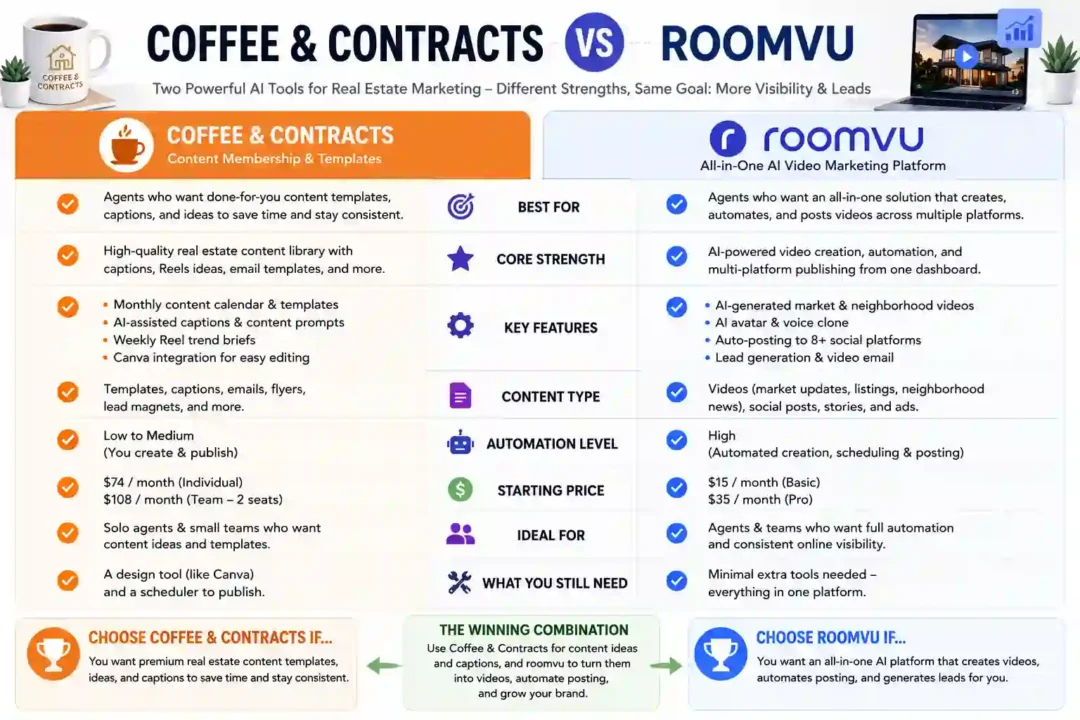
1. Coffee & Contracts — Best for Real Estate-Specific Templates & Captions
Coffee & Contracts is a content membership built exclusively for real estate agents, not a general marketing tool with a real estate skin on it. Every template, caption, and Reel script inside it is written for listings, open houses, market updates, and buyer/seller education, so there’s no filtering through off-topic content.
Key features:
- Monthly content calendar with done-for-you Instagram and Facebook templates
- Weekly Reel trend briefs with trending audio and a real estate-specific creative brief
- AI-assisted caption generation and content prompts built directly into templates
- Email newsletters, lead magnets, and print flyers included in the same subscription
- Direct integration with Canva for one-click editing
Pricing: Individual plan around $74/month or $740/year. Team plans start around $108/month for two seats.
Pros:
- Every asset is written specifically for real estate, so there’s no need to “prompt it” into sounding like an agent
- Weekly Reel trend briefs solve the “what’s trending right now” research problem
- Strong community and coaching layer beyond just the templates
Cons:
- It’s a content library, not a scheduler. You still need Canva or a separate tool to publish
- Pricier than generic AI writing tools for a solo agent posting only occasionally
- No native video editing; Reel scripts still need to be filmed and edited elsewhere
2. roomvu — Best All-in-One AI Video Marketing Platform for Agents
roomvu is built around a different idea than most tools on this list: instead of you prompting an AI every time, roomvu’s Autonomous Visibility System pulls MLS listings, local market data, and neighborhood news to auto-generate a rolling two-week content calendar, then posts it across multiple channels without you logging in.
Key features:
- AI-generated market update, submarket, and neighborhood videos pulled from live data
- AI Avatar and Voice Clone tools that turn a single photo or short clip into a library of branded talking-head videos
- Automated posting up to 5–7 times a week across eight social channels, including Instagram Stories, LinkedIn, and X
- Engage AI receptionist that follows up with leads by call, text, and email in multiple languages
- MCP-style integration that lets you manage listings and schedule content by chatting with an AI assistant directly
Pricing: Tiered plans (Premium, Platinum, Diamond) built around AI credits rather than one flat number, with Platinum and above adding the AI Avatar and Voice Clone features. A free limited trial is available, but full plan pricing isn’t published, so contact roomvu directly for a current quote.
Pros:
- The most comprehensive real estate-specific video and social platform on this list: content creation, distribution, and lead follow-up in one system
- Genuinely hyper-local: content is generated from your actual market data, not generic real estate stock content
- Strong fit for agents who want to “set it and mostly forget it”
Cons:
- Pricing opacity makes it harder to comparison-shop before a sales call
- Some user reviews cite billing friction and inconsistent lead quality on entry-level plans
- Heavier onboarding than a simple app you download and start using same-day
3. HeyGen — Best AI Avatar Videos for Listings & Market Updates
HeyGen turns a typed script into a video of you (or a stock avatar) speaking it, with synced lip movement, gestures, and natural pacing. For agents, the practical use case is simple: record yourself once for two to five minutes, and from then on you can generate a new market update or listing intro just by typing a script.
Key features:
- Digital Twin avatars trained from a short personal video recording
- 230+ stock avatars and support for 175+ languages, useful for multilingual buyer outreach
- Video Agent, which builds a full video (script, avatar, voice, transitions) from a single text prompt
- Voice cloning and lip-synced video translation for reaching non-English-speaking buyers
- 1080p and 4K export on paid tiers
Pricing: Free plan (3 videos/month, watermarked). Creator plan around $29/month. Pro around $99/month. Business around $149/month plus $20 per additional seat.
Pros:
- Fastest way to produce a weekly market update or listing intro without being on camera every time
- Multilingual dubbing is genuinely useful in diverse buyer markets
- Avatar quality on the higher-tier engine is convincing enough for professional use
Cons:
- Runs on a credit system where higher-quality avatars burn through your monthly allowance fast. “Unlimited videos” doesn’t mean unlimited premium quality
- Adding team seats doesn’t add shared credits, which catches teams off guard
- Overusing one avatar across every post can start to feel repetitive to your audience, so mix it with real, unscripted video
4. InVideo AI — Best for Text-to-Video Reels & Property Ads
InVideo AI takes a single prompt, something like “a 60-second Instagram Reel about why buyers should look at this ranch-style listing,” and produces a complete draft: script, stock or AI-generated footage, voiceover, subtitles, and music. It’s currently one of the only platforms that bundles access to both Sora 2 and Veo 3.1 inside a flat subscription.
Key features:
- Full script-to-video generation using a large media library and generative AI models
- Magic Box editor lets you revise the video with plain-language commands instead of a timeline
- Voice cloning and AI avatars for UGC-style ad content
- Brand Kit for consistent colors, logo, and fonts across every video
- Automatic subtitles and dubbing in 50+ languages
Pricing: Free plan (10 AI minutes/week, watermarked). Paid plans start around $25–28/month billed annually, scaling up for more generative video minutes and premium model access.
Pros:
- Genuinely useful for turning listing photos and a market data point into a finished ad or Reel without filming anything
- Frontier video models bundled at a fraction of their standalone cost
- Good stock media fallback when generative output misses the mark
Cons:
- Credit pools for AI minutes, stock downloads, and voice cloning are tracked separately and don’t roll over
- AI-written scripts can sound generic without editing for your specific market and voice
- Not built for real estate specifically, so you’re doing more manual prompting than with a real estate-native tool
5. Opus Clip — Best for Turning Property Tours into Reels & Shorts
If you already film long-form video (open house walkthroughs, live Q&As, market update livestreams), Opus Clip is the tool that turns one recording into a week of short-form content. Upload a video, and its AI finds the strongest moments, cuts them into vertical clips, and adds animated captions automatically.
Key features:
- ClipAnything model works on talking-head footage, walkthroughs, and videos with little dialogue
- Virality Score rates each generated clip so you know which ones to prioritize posting
- Auto-generated captions in 20+ languages with trending caption styles
- One-click scheduling to TikTok, Instagram Reels, and YouTube Shorts on higher tiers
- XML export to Premiere Pro and DaVinci Resolve for agents who want to finish editing manually
Pricing: Free plan (60 minutes of source video processing/month, watermarked). Starter around $15–19/month. Pro around $29/month. Business tier custom-priced.
Pros:
- Best-in-class at the specific job of finding the good 30 seconds inside a 10-minute walkthrough
- Virality scoring removes the guesswork of which clip to post first
- Massive time saver for agents who already film but never repurpose
Cons:
- It’s a repurposing tool only: no script writing, no recording feature, and nothing to work with if you have no source footage
- Some users report being charged for renewals while unused credits remain, so watch your billing cycle
- Doesn’t add narration or a branded intro on its own, so pair it with a caption or hook-writing step
6. CapCut — Best Free Video Editor for Instagram Reels & TikTok
CapCut is built by ByteDance, TikTok’s parent company, and it’s the most widely used free editor for short-form vertical video for a reason. For agents who want to hand-edit their own clips (adding trending audio, transitions, or text overlays), it’s the fastest, most reliable free option.
Key features:
- Industry-leading auto-captions with karaoke-style animation
- Massive template library that updates with trending formats
- Background removal, smart trimming, and one-click aspect ratio resizing
- Direct access to trending TikTok audio, which matters for algorithmic reach
Pricing: Free. Pro plan around $8/month for extra effects and export options.
Pros:
- Free tier alone covers most of what an agent needs for consistent short-form posting
- Best auto-caption quality of any mainstream mobile editor
- Native trending-audio access is a real advantage for TikTok and Reels reach
Cons:
- No real estate-specific templates or scripting; you bring the footage and the idea
- Not an AI content generator; it’s an editor, so it works best alongside a repurposing or scripting tool
- Some premium effects and export options are locked behind Pro
7. Predis.ai — Best AI Social Media Content Generator for Busy Agents
Predis.ai takes a listing URL, a topic, or a short prompt and generates captions, graphics, carousels, and short videos in one pass, then can schedule them across nine platforms. It’s one of the more purpose-built AI social tools for agents who want speed over customization.
Key features:
- Generates image posts, carousels, and short videos from a single text prompt or listing link
- Competitor analysis by connecting your Facebook Page and Instagram account
- Brand Kit that automatically applies your logo, colors, and tone of voice to generated content
- Support for 18+ languages
- Scheduling and direct publishing across Instagram, Facebook, TikTok, LinkedIn, YouTube, Pinterest, and X
Pricing: Credit-based system starting around $19–32/month for entry tiers, scaling to roughly $59/month and up to $212–249/month for higher-volume plans.
Pros:
- Fastest single tool for going from “I have a new listing” to a finished, branded post
- Competitor analysis is a genuinely differentiated feature for understanding what’s working locally
- Multi-platform publishing removes the need for a separate scheduler on lower usage volumes
Cons:
- Credit system gets restrictive fast for agents posting daily across several platforms
- Auto-posting is capped even on higher tiers, and some users report reliability issues with scheduled posts
- No social listening or brand-mention monitoring
8. Canva Magic Studio — Best for Branded Graphics, Carousels & Quick Design
Canva isn’t a real estate tool, but its AI features have become close to essential for agents who need professional-looking graphics without hiring a designer. Magic Design generates layout options from a text prompt, and Magic Write drafts captions and headlines you can edit to match your voice.
Key features:
- Magic Design generates multiple graphic layouts from a prompt like “luxury open house invitation for a 4-bedroom waterfront property”
- One-click resizing of a single design across every platform format (Instagram post, Story, Facebook cover, and more)
- Background removal, AI image generation, and text rewriting
- Brand Kit auto-applies your brokerage colors, fonts, and logo to any design
- Direct compatibility with Coffee & Contracts templates for one-click customization
Pricing: Free tier available. Canva Pro around $13/month billed annually.
Pros:
- Cheapest, fastest way to produce polished graphics, quote posts, and just-listed/just-sold announcements
- One-click multi-platform resizing saves real time every week
- Enormous template ecosystem, including real estate-specific designs from third parties
Cons:
- Video tools are basic compared to dedicated AI video platforms
- Magic Write’s captions are generic without real estate-specific prompting
- Not built with fair housing or MLS compliance guardrails, so output still needs a human review pass
9. BombBomb — Best AI-Enhanced Video Email for Lead Follow-Up
BombBomb isn’t a social media tool. It’s the follow-up layer that most agents skip. You record a short webcam or screen video, and it embeds as a playable, animated GIF preview directly inside your email or LinkedIn message, so the recipient sees your face moving before they even open it.
Key features:
- Webcam and screen recording with quick trim-and-stitch editing, no video experience required
- Animated GIF preview embedded in Gmail and Outlook, reported to lift open rates and reply rates significantly compared to text-only email
- Real-time engagement tracking showing who watched, how long, and when
- Integrations with real estate CRMs including Follow Up Boss, BoomTown, dotloop, and Wise Agent
- Video messaging inside LinkedIn for relationship-building with your professional network
Pricing: Core plan around $36–42/month per user. Core + Copilot around $56–70/month per user. Enterprise custom-priced.
Pros:
- Real estate is BombBomb’s single largest user vertical, and the integrations reflect that
- Genuinely effective for warm follow-up: transaction updates, past-client check-ins, and new-lead first response
- Engagement tracking tells you exactly who to call back next
Cons:
- No AI script-writing or content generation; you’re recording and speaking it yourself
- Per-seat pricing adds up quickly for a team
- Not designed for cold, high-volume outbound; it’s built for relationship-driven follow-up, not prospecting at scale
10. ChatGPT & Claude — Best for Scripts, Captions & Content Ideas
Before any video gets filmed or any caption gets posted, most of it starts as a written idea. ChatGPT and Claude are the fastest way to go from “I need content for this listing” to a usable script, caption set, or week of content ideas.
Key features:
- Turns raw listing details or market data into Instagram captions, video scripts, and hashtag sets in seconds
- Useful for drafting the script you’ll later feed into HeyGen, InVideo AI, or read on camera
- Can maintain a consistent brand voice across a batch of posts when given clear examples to follow
- Custom GPTs (ChatGPT) and Projects (Claude) let you save a “real estate content assistant” with your voice and market baked in
Pricing: Free tiers available for both. ChatGPT Plus and Claude Pro are each priced around $20/month.
Pros:
- Cheapest, most flexible starting point on this entire list
- Great for brainstorming a month of content in one sitting instead of daily blank-page dread
- Pairs with literally every other tool on this list as the scripting step
Cons:
- Neither is real estate-specific out of the box, so output needs a market-accuracy and fair housing language review
- No native video or image generation in Claude; ChatGPT’s image tools aren’t tuned for real estate visuals
- Generic prompts produce generic captions, so you still need to feed it specifics about the listing and your voice
Quick Comparison: Which Tool Fits Which Job
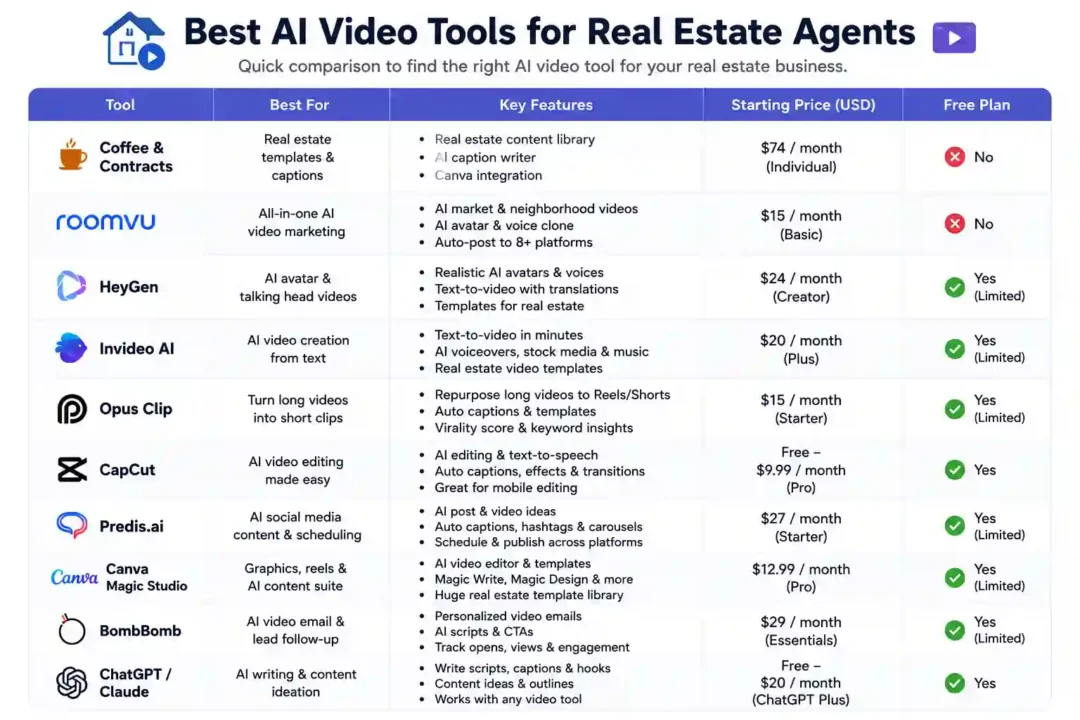
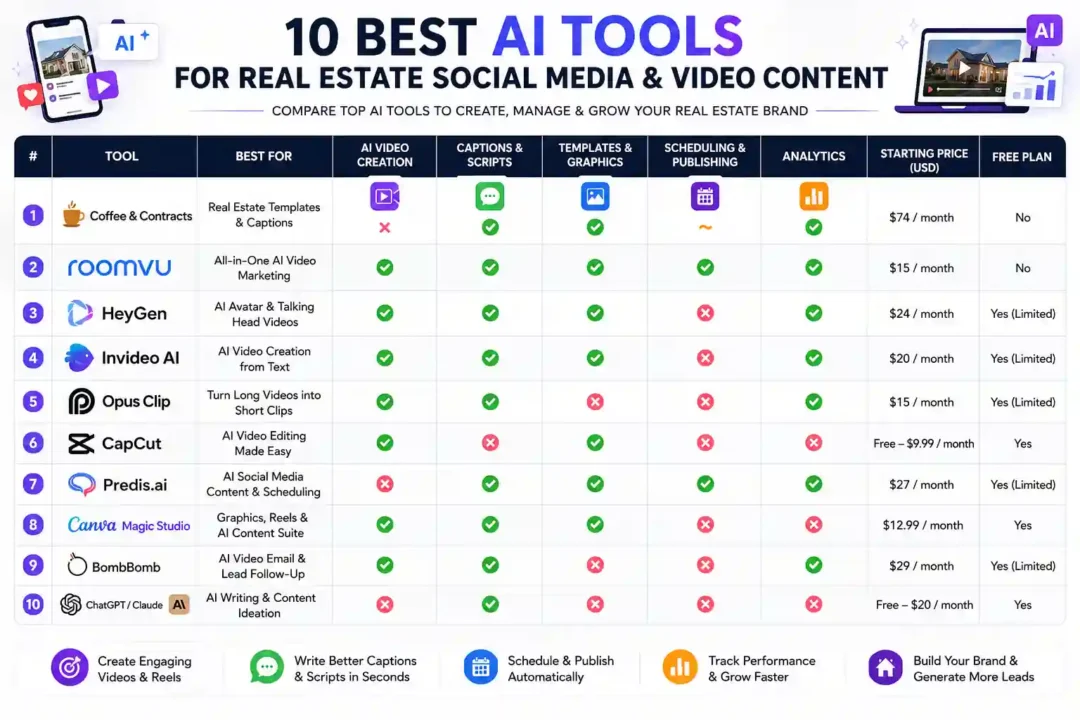
| Tool | Best For | Starting Price | Real Estate-Specific |
|---|---|---|---|
| Coffee & Contracts | Templates, captions, Reel scripts | ~$74/month | Yes |
| roomvu | All-in-one video + social + lead follow-up | Tiered, quote-based | Yes |
| HeyGen | AI avatar listing & market update videos | Free / ~$29/month | No |
| InVideo AI | Text-to-video Reels & property ads | Free / ~$25/month | No |
| Opus Clip | Turning long video into Reels & Shorts | Free / ~$15/month | No |
| CapCut | Free Reel & TikTok editing | Free / ~$8/month | No |
| Predis.ai | AI captions, graphics & scheduling | Free trial / ~$19/month | Partial |
| Canva Magic Studio | Branded graphics & carousels | Free / ~$13/month | No |
| BombBomb | AI-enhanced video email follow-up | ~$36/month | Real estate is top vertical |
| ChatGPT / Claude | Scripts, captions & content ideas | Free / ~$20/month | No |
How to Build a Real Estate Social Media & Video Workflow With These Tools
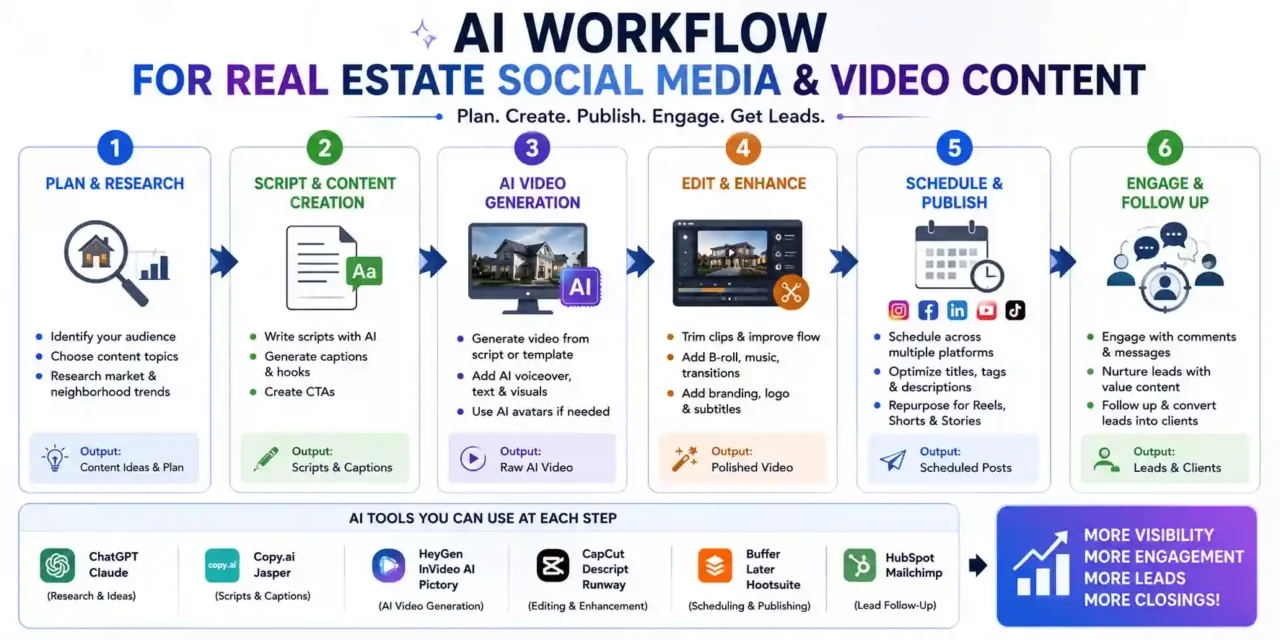
Most agents don’t need every tool on this list running at once. A simple, repeatable workflow looks like this:
- Film once. A phone walkthrough of the listing, or a 60-second talking-head market update, is your raw material.
- Skip the camera when you need to. If you can’t film every week, generate the same market update as an AI avatar video in HeyGen, or build it from a prompt in InVideo AI.
- Repurpose the long version. Feed your walkthrough or livestream into Opus Clip to get five to ten short, captioned clips optimized for Reels, TikTok, and Shorts.
- Polish in CapCut. Add trending audio, extra text, or transitions if the clips need more energy.
- Write the words in ChatGPT or Claude. Turn listing details or market data into captions and hooks, or pull from Coffee & Contracts’ caption library if you’re a member.
- Design the static support pieces. Just-listed, just-sold, and open house graphics get built fast in Canva.
- Schedule and publish. Predis.ai or roomvu can handle multi-platform scheduling; Coffee & Contracts members export straight to Canva and post manually or through their own scheduler.
- Follow up with the leads it generates. Send a personal video recap through BombBomb to anyone who reached out from your content. This is the step most agents skip, and it’s where the actual conversions happen.
AI Disclosure and Fair Housing: What Agents Should Keep in Mind
AI-generated real estate video is moving fast, and the norms around disclosure are still catching up. A few practical guardrails worth building into your workflow:
- Treat AI avatars and AI-enhanced video the way you’d treat virtual staging. Many MLSs and brokerages already require disclosure when listing photos are substantially altered. Check whether your local MLS or brokerage expects the same for AI avatar or AI-generated video, and disclose when in doubt.
- Mix AI-generated content with real, unscripted video. Buyers respond to authenticity. An avatar can handle a weekly market stat update; your actual voice and face should still show up regularly.
- Review AI-written captions for fair housing language. AI writing tools don’t automatically know which phrases (like describing a neighborhood as “family-friendly” or “safe”) can raise fair housing concerns. A quick human read-through before posting matters.
- Don’t let AI invent property features. Whether it’s an AI-generated video or an AI-written caption, never present something about a property that isn’t real. It creates the same “bait-and-switch” trust problem as a misleading photo.
Common Mistakes Agents Make With AI Video & Social Tools
- Relying on one AI avatar for everything. Overusing the same digital twin across every post starts to feel synthetic to a following that wants to know the real you.
- Never repurposing existing footage. Filming a walkthrough once and posting it once, when it could have produced a week of short clips, is the single most common waste of effort on this list.
- Ignoring the credit system until it’s a problem. Most of these tools bill on credits, not flat “unlimited” access. Know your monthly usage before you commit to a tier.
- Posting AI-written captions without a market-accuracy check. Generic AI output doesn’t know your neighborhood, your MLS rules, or your brand voice unless you tell it.
- Skipping the follow-up step. Social content generates attention; video email tools like BombBomb are what turn that attention into an actual conversation.
FAQs
What is the best free AI tool for real estate social media?
CapCut is the strongest free option for video editing, and Canva’s free tier covers basic AI-assisted graphic design. ChatGPT and Claude also have usable free tiers for captions and scripts. None of the real estate-specific platforms on this list (Coffee & Contracts, roomvu) offer a permanent free plan, though most offer a short trial.
Can AI actually create a full property tour video on its own?
AI tools like InVideo AI can generate a polished video from listing photos and a script, and roomvu can auto-generate market and neighborhood videos from your MLS data. But a fully AI-generated walkthrough still can’t replace footage of the actual property. Buyers expect to see the real space, so AI works best for the narration, editing, and repurposing layers, not for inventing the tour itself.
Do real estate agents need to disclose AI-generated video or avatars?
There’s no single universal rule yet, but many MLSs and brokerages that already require disclosure for heavily edited or virtually staged photos are extending similar expectations to AI-generated video. Check your specific MLS and brokerage policy, and default to disclosing when the content is substantially AI-altered.
What’s the difference between an AI video generator and an AI video editor?
A generator like HeyGen or InVideo AI creates a video from a script or prompt, often with no source footage required. An editor or repurposing tool like CapCut or Opus Clip works with footage you already have, either polishing it or cutting it into shorter pieces.
How much should an agent budget monthly for social media and video AI tools?
A lean starting stack, one real estate-specific content tool plus one video repurposing tool, typically runs $50–100/month. A fuller stack that adds an AI avatar tool, a scheduler, and video email for follow-up can land between $150–300/month, which is comparable to what agents already spend piecing together separate design, scheduling, and editing subscriptions.
Can these tools post directly to Instagram and TikTok for me?
Some can. roomvu, Predis.ai, and Opus Clip’s higher tiers all support direct or scheduled publishing to major platforms. Coffee & Contracts and Canva do not post directly; you export the finished asset and publish it yourself or through a separate scheduler.
Is Coffee & Contracts or roomvu the better choice for real estate video?
They solve different problems. Coffee & Contracts is strongest for ready-made templates, captions, and Reel scripts you customize and film yourself. roomvu is stronger if you want video generated automatically from your market data and MLS listings, plus AI avatar video and lead follow-up in the same platform. Agents who want full creative control often prefer Coffee & Contracts; agents who want more automation lean toward roomvu.
Can I use ChatGPT or Claude to write real estate video scripts?
Yes, and it’s one of the most practical uses of either tool. Feed it the listing details, your target buyer, and the tone you want, and it will draft a script you can read on camera, feed into an AI avatar tool, or hand to an editor. Always give it specific, local details rather than a generic prompt. The more specific the input, the less generic the output.
Conclusion
The agents winning on social media in 2026 aren’t the ones spending the most hours on content. They’re the ones who’ve built a short, repeatable system for turning one piece of footage or one listing into a week’s worth of material. Start small: pick one real estate-specific content tool and one repurposing or avatar tool, run them for a month, and add pieces like BombBomb for follow-up once you see which content is actually generating conversations.
If you’re building out your full AI marketing stack, this page pairs naturally with our guides on AI virtual staging tools, AI voice agents for real estate, and the complete Best AI Tools for Real Estate Agents 2026 pillar guide.