
Table of Contents
Quick Answer
If you’re a personal trainer losing hours every week to back and forth texting and last minute no-shows, dedicated booking software solves that problem fast. The best AI scheduling apps for personal trainers in 2026 are ABC Trainerize and TrueCoach if you also want to deliver workout programs, Acuity Scheduling and Calendly if you want a clean standalone booking page, Vagaro and Mindbody if you run a studio with multiple trainers, and Square Appointments or Setmore if you’re a solo trainer who wants something simple and cheap.
Every app on this list lets clients book their own sessions, sends automated reminders that cut down on no-shows, and syncs with your calendar so you’re never double booked. The right pick depends on whether you need scheduling by itself or scheduling bundled with programming, payments, and client tracking.
Why Personal Trainers Need Smarter Scheduling Software
If you’ve ever typed out the same “see you at 6am tomorrow” text to ten different clients by hand, you already know the problem. Manual scheduling eats time that should go toward actual coaching. It also opens the door to double bookings, forgotten sessions, and clients who ghost you because nobody sent a reminder. This is exactly the gap that AI scheduling apps for personal trainers are built to close.
An AI scheduling app for personal trainers fixes this by handling the repetitive parts of running a training business automatically. That doesn’t mean a robot is making decisions for you. In this category, “AI” usually means the software can:
- Recommend and hold open time slots based on your real availability
- Send reminder texts and emails without you lifting a finger
- Fill cancellations from a waitlist automatically
- Answer common client questions or confirm bookings through automated messaging
- Flag scheduling conflicts before they happen
For a one-person training business, that adds up to real hours back in your week. For a studio with several trainers, it’s the difference between a calendar that runs itself and a front desk that’s constantly putting out fires.
What to Look For in an AI Scheduling App for Personal Trainers
Not every scheduling tool is built with personal trainers in mind. A lot of general-purpose booking apps are designed for hair salons or dentist offices, and they miss things trainers actually need, like session packages, recurring weekly slots, and progress tracking tied to the client relationship. Here’s what actually matters when you’re comparing options.
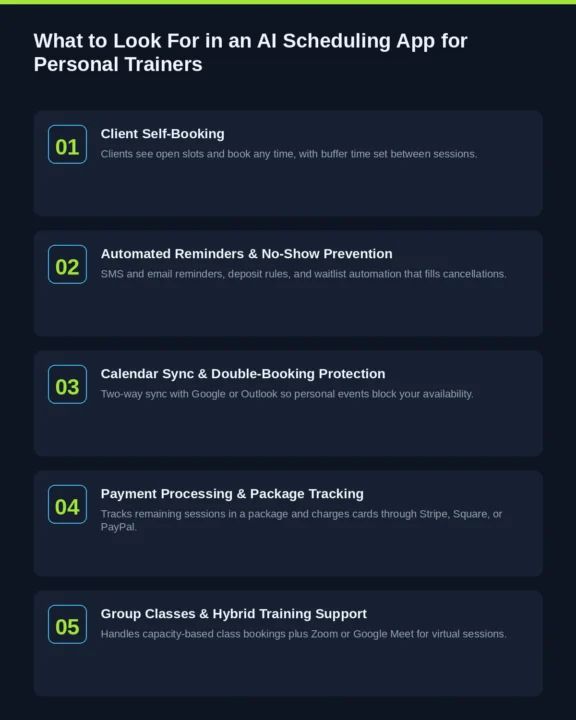
Client Self-Booking
Your clients should be able to see your open slots and book themselves, day or night, without a phone call or a string of texts. A good booking page also lets you set buffer time between sessions so you’re not sprinting from one client straight into the next.
Automated Reminders and No-Show Prevention
This is where the AI label earns its keep. Look for software that sends a reminder a day out and another closer to session time, through SMS and email. Some platforms go further with no-show fees, deposit requirements, or waitlist automation that fills a cancelled slot without you having to text your whole client list.
Calendar Sync and Double-Booking Protection
Your scheduling app should sync two ways with Google Calendar or Outlook. That way personal appointments block off your availability automatically, and a client can never book a slot you’ve already filled somewhere else.
Payment Processing and Package Tracking
Personal trainers usually sell sessions in packages, not one at a time. The better apps track remaining sessions in a package, charge cards on file, and integrate with processors like Stripe, Square, or PayPal so you’re not chasing payments separately from bookings.
Support for Group Classes and Hybrid Training
If you run bootcamps, small group sessions, or a mix of in-person and online coaching, check that the app handles class-style bookings with capacity limits, not just 1:1 appointments. Zoom or Google Meet integration matters here too if any part of your coaching happens virtually.
AI-Specific Extras Worth Paying For
A few platforms now offer automated front-desk messaging that can confirm, reschedule, or cancel a booking through text without a staff member touching it. Others use booking pattern data to suggest better time slots or flag clients who are at risk of missing a session. These extras are what separate the more advanced AI scheduling apps for personal trainers from a basic online calendar, though they aren’t essential for every trainer. They matter more as your client list grows.
The Best AI Scheduling Apps for Personal Trainers in 2026
Here’s how the most established options stack up. Pricing changes often in this category, so treat the numbers below as a starting point and confirm current rates on each provider’s site before you commit.
1. ABC Trainerize: Best All-in-One Platform for Coaching and Scheduling
Trainerize (now ABC Trainerize, following its acquisition by ABC Fitness) is built primarily around workout programming, but its Pro plans include appointment scheduling, calendar sync, and an AI workout builder that speeds up programming. It goes furthest of any tool here in tying booking to actual coaching, since scheduling and program delivery live in the same app instead of two separate tools.
Pricing scales with your number of active clients, generally starting in the mid-twenties per month for a small roster and climbing as you add clients or bolt on features like nutrition coaching and branded apps.
Pros:
- Combines scheduling, workout delivery, messaging, and habit tracking in one place
- Deep automation for check-ins and re-engagement messages
- Wearable integrations with Apple Health and similar tools
- Large, established user base with responsive mobile apps
Cons:
- Pricing climbs quickly once you add clients and add-ons
- Nutrition tools and branded apps cost extra
- Some users report a learning curve for the more advanced automation features
Best for: Online and hybrid coaches who want scheduling bundled with full program delivery.
2. TrueCoach: Best for Trainers Who Coach Mostly Online
TrueCoach focuses on video-based coaching, exercise demonstration, and clean client communication, with scheduling built in as a core feature rather than an add-on. It’s particularly well suited to strength, bodybuilding, and remote coaching where client experience is the priority.
Pricing is based on active client count, with entry plans built for smaller rosters and costs rising as your client list grows.
Pros:
- Clean, well-reviewed client-facing mobile app
- Strong in-app video feedback for form checks
- Simple scheduling workflow that doesn’t require a steep learning curve
Cons:
- Habit tracking and automation are lighter than some competitors
- Has an Android app, but coach-side programming tasks still redirect to the web version rather than working fully in-app
- Scales in cost as your client count increases
Best for: Independent trainers running 10 to 30 clients who coach primarily online.
3. Acuity Scheduling: Best Standalone Booking Page
Acuity, owned by Squarespace, is a pure scheduling tool rather than a full coaching platform. That’s actually its strength if you already use separate software for programming and just need a reliable booking page with automated reminders, intake forms, and payment collection.
Plans run in tiers, with the entry tier suited to a single trainer and higher tiers adding multi-staff coordination and more automation.
Pros:
- Reliable two-way calendar sync with Google and Outlook
- Custom intake forms, useful for pre-session health questionnaires
- Flexible package and membership billing
- Clean, easy-to-customize booking page
Cons:
- No free plan
- No built-in video conferencing, you’ll need Zoom separately
- Support is email-only on lower tiers
Best for: Trainers who want a dedicated booking layer without paying for coaching features they won’t use.
4. Calendly: Best for Simple 1:1 Session Booking
Calendly isn’t built specifically for fitness, but plenty of solo trainers use it because it’s fast to set up and the free plan covers basic 1:1 booking. Recent updates added AI features like natural language scheduling requests and automatic meeting notes, though these lean more toward business meetings than fitness-specific workflows.
The free plan works for a single event type. Paid plans add multiple session types, payment collection, and team scheduling.
Pros:
- Genuinely useful free tier
- Extremely fast setup, most trainers are live in under an hour
- Wide integration library with calendars and payment tools
Cons:
- Not built with session packages or fitness-specific billing in mind
- No client progress tracking or workout delivery
- Group class scheduling is limited compared to fitness-specific platforms
Best for: New or budget-conscious trainers who just need simple appointment booking.
5. Vagaro: Best Affordable All-in-One for Studios and Solo Trainers
Vagaro serves salons, spas, and fitness businesses under one roof, and it’s a common choice for personal trainers who want more than bare-bones scheduling without paying enterprise prices. It covers online booking, staff calendars, memberships, packages, and automated reminders, and clients can also find and book through Vagaro’s own marketplace.
Pricing is generally lower than Mindbody at comparable feature levels, which is why it’s popular with solo trainers and small studios.
Pros:
- Lower cost of entry than most studio-grade platforms
- Reminders and confirmations are rated consistently reliable by users
- Booking available through Facebook, Google, and Vagaro’s marketplace
- No long-term contract required
Cons:
- Less depth for very large, multi-location operations
- Add-ons can push the price higher than the advertised starting rate
- Interface feels more salon-oriented than fitness-specific in places
Best for: Solo trainers and small studios that want an all-in-one system at a reasonable price.
6. Mindbody: Best for Multi-Trainer Studios and Gyms
Mindbody is the enterprise option on this list. It’s built for studios and gyms managing multiple trainers, class schedules, and locations, with a consumer-facing marketplace app that exposes your business to new clients searching nearby. Its AI-powered front desk assistant can handle after-hours booking questions and confirmations automatically.
Pricing starts around the low hundreds per month per location for the Starter tier and rises well past that for Accelerate and Ultimate, which unlock marketing automation and deeper analytics.
Pros:
- Marketplace exposure to millions of active app users
- Automated AI messaging for after-hours booking and FAQs
- Strong multi-location and multi-staff scheduling controls
- Detailed business reporting and analytics
Cons:
- Pricing is quoted by sales rather than published, and it climbs fast with add-ons
- Marketplace bookings carry a commission on top of standard processing fees
- Steeper onboarding curve than smaller competitors
- Typically requires a longer contract term
Best for: Studios and gyms running multiple trainers and locations that need enterprise-level features.
7. Square Appointments: Best for In-Person Trainers Already Using Square
If you already take card payments through Square, Square Appointments keeps scheduling and billing under the same roof. Its Square Assistant feature automatically replies to clients to confirm, cancel, or reschedule appointments around the clock, which is a genuinely useful AI feature for a trainer who can’t always answer texts mid-session.
There’s a free tier for a single location, with paid plans starting around $49/month per location for the Plus tier and rising to roughly $149/month per location for Premium, which adds resource booking and deeper staff permissions.
Pros:
- Tight integration with Square payments and point of sale
- Automated messaging handles routine scheduling questions without staff involvement
- Syncs with Google’s “Reserve with Google” so clients can book from a Google search
- Free plan available for single-location trainers
Cons:
- Best value only if you’re already inside the Square payments ecosystem
- No built-in Zoom or Google Meet integration for virtual sessions
- Fewer fitness-specific features like package tracking compared to purpose-built PT software
Best for: In-person trainers who already process payments through Square.
8. Setmore: Best Free Scheduling App for New Trainers
Setmore is worth a look if you’re just starting out and don’t want a monthly bill yet. The free plan includes unlimited appointments, a customizable booking page, and email reminders, which covers the basics most new trainers need.
Paid plans add two-way Google Calendar sync, Zoom integration, and more advanced automation, generally priced per user per month.
Pros:
- Free plan is genuinely usable, not just a trial
- Booking page connects to Instagram and Facebook for social-driven bookings
- Payment integration with Square, Stripe, and PayPal
- 24/7 human support even on the free tier
Cons:
- Zoom integration and full calendar sync require a paid plan
- Not designed specifically for fitness businesses, so package tracking is basic
- Limited client progress or workout-related features
Best for: New or part-time trainers who want a professional booking page without a monthly cost.
9. PTminder: Best for Scheduling Plus Billing Operations
PTminder leans into the business side of personal training rather than workout delivery. If your biggest headache is calendar management, invoicing, and tracking how many sessions a client has left on their package, this is built specifically for that workflow.
Pricing is typically based on client count, aimed at independent trainers and small studios running mostly in-person sessions.
Pros:
- Strong scheduling and calendar management purpose-built for personal training
- Package and session-credit tracking is more detailed than general booking tools
- Automated SMS and email reminders included
- Solid invoicing and financial reporting
Cons:
- Lighter on workout programming and client coaching features
- Less suited to trainers who coach primarily online
- Smaller integration ecosystem than bigger platforms like Trainerize
Best for: In-person trainers whose main pain point is calendar and payment management, not programming.
Standalone Booking App or All-in-One Coaching Platform? How to Decide
This is the real fork in the road when choosing an AI scheduling app for personal trainers.
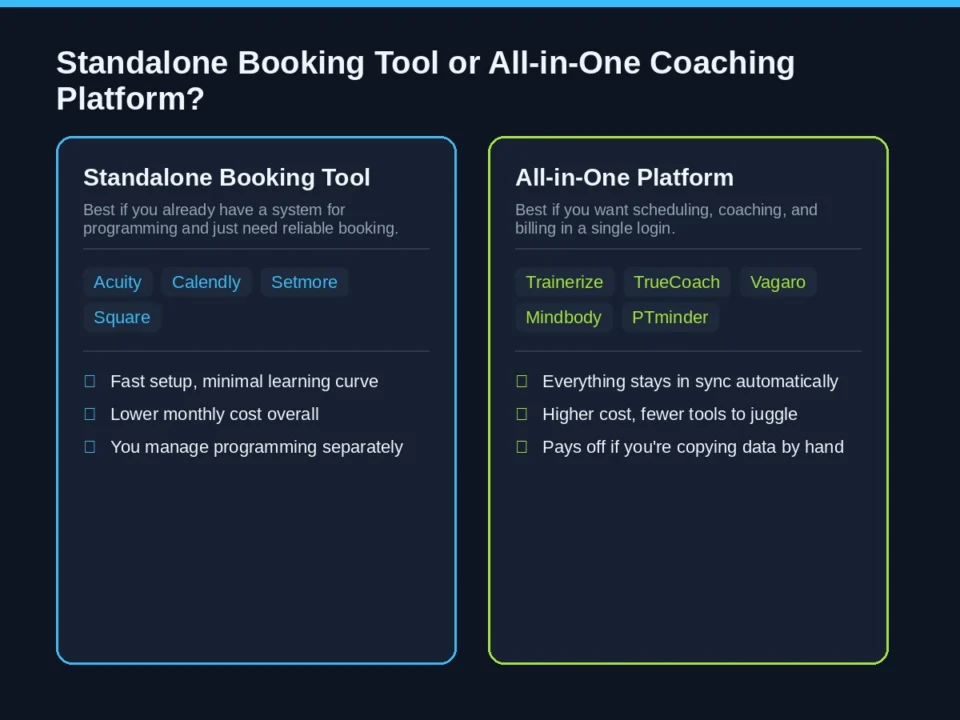
Choose a standalone booking tool (Acuity, Calendly, Setmore, Square Appointments) if you already have a system for programming workouts and tracking progress, and you just need a reliable way for clients to book and pay for sessions.
Choose an all-in-one platform (Trainerize, TrueCoach, Vagaro, Mindbody, PTminder) if you’d rather manage scheduling, client communication, and either programming or billing inside a single login. It costs more, but it usually saves time you’d otherwise spend keeping two systems in sync.
A simple way to test this: if you’re currently using more than one tool to run your training business, and you’re manually copying information between them, an all-in-one platform will probably pay for itself in saved time within a month or two.
What These Apps Actually Cost: 2026 Pricing Snapshot
Here’s a quick side-by-side of what the leading AI scheduling apps for personal trainers cost right now, so you can narrow things down before reading the full breakdown above.
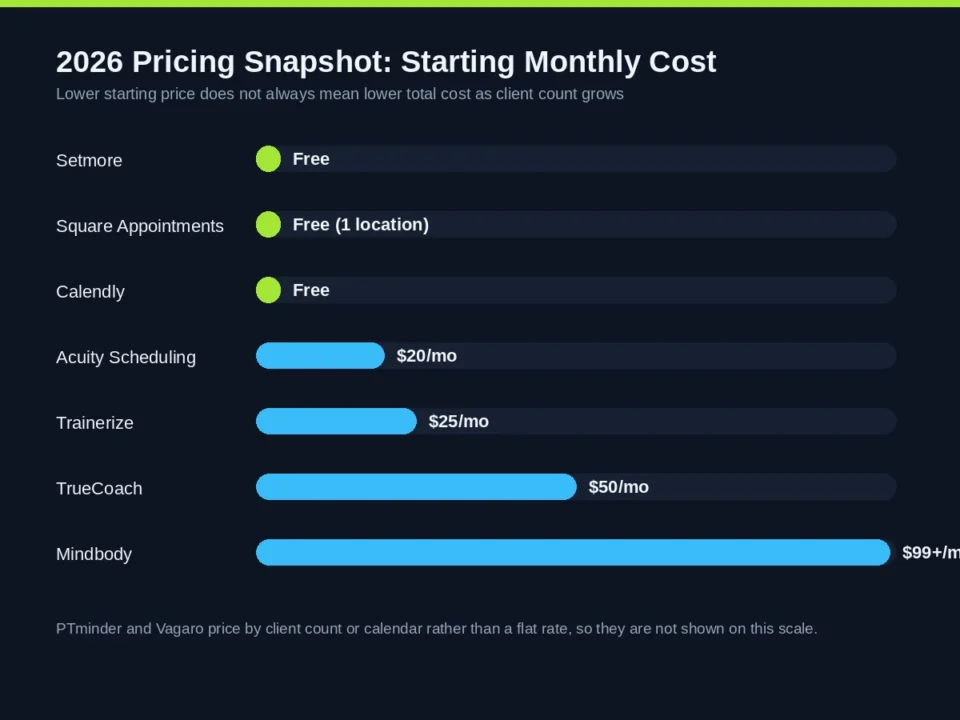
| App | Starting Price | Best Fit |
|---|---|---|
| Setmore | Free, paid plans from around $9 to $12/user/month | New or budget-conscious trainers |
| Square Appointments | Free for one location, paid plans from around $49/month | Trainers already using Square |
| Calendly | Free, paid plans from $10/seat/month | Simple 1:1 booking |
| Acuity Scheduling | From around $20/month | Standalone booking page |
| TrueCoach | From roughly $50/month depending on client count | Online, video-based coaching |
| Trainerize (ABC Trainerize) | From roughly $25/month, scales with client count | Coaching plus scheduling in one app |
| PTminder | Priced by client count, contact for a quote | In-person scheduling and billing |
| Vagaro | Priced per calendar, generally below Mindbody | Affordable studio all-in-one |
| Mindbody | From roughly $99 to $150/month per location, rising with tier | Multi-trainer studios and gyms |
These figures were checked against each provider’s published pricing as of July 2026, but plans change often in this category, so confirm the current rate on the provider’s site before you sign up. Most of these apps offer a free trial, which is the fastest way to know if the workflow actually fits how you train clients.
How AI Actually Cuts Down No-Shows and Admin Work
It’s worth being specific about what’s actually happening under the hood, since “AI scheduling” gets used loosely in marketing copy. Here’s what the better AI scheduling apps for personal trainers are really doing behind the scenes.
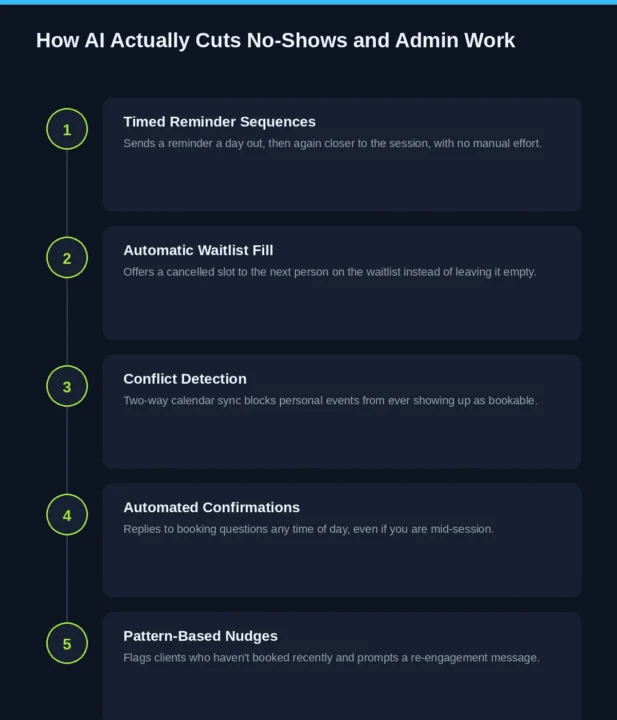
- Timed reminder sequences. Instead of you remembering to text each client, the software sends a reminder at a set interval before the session, then again closer to the appointment time, without any manual effort on your end.
- Automatic waitlist fill. When a client cancels, the app can offer that slot to the next person on a waitlist automatically, instead of the time just sitting empty.
- Conflict detection. Two-way calendar sync means a personal appointment on your Google Calendar blocks that slot from ever showing up as available to clients.
- Automated confirmations. Some platforms, like Square Appointments and Mindbody, use automated messaging to confirm or reschedule bookings around the clock, so a client texting at 9pm still gets an instant reply instead of waiting until morning.
- Pattern-based nudges. A few platforms flag clients who haven’t booked in a while, prompting a re-engagement message before they quietly disappear from your schedule.
None of this replaces the relationship you build with a client in the room. It just clears out the administrative noise so you can spend more of your time actually coaching.
Frequently Asked Questions
What does “AI scheduling” actually mean for personal trainers?
In most AI scheduling apps for personal trainers, the term refers to automation, not a chatbot replacing you. It covers things like automated reminders, waitlist filling, conflict detection, and messaging that confirms or reschedules a booking without you doing it manually.
What is the best free scheduling app for personal trainers?
Setmore has the most usable free plan, with unlimited appointments and a custom booking page. Square Appointments and Calendly also offer functional free tiers if you only need basic 1:1 booking.
Can I use Calendly for personal training sessions?
Yes, especially if you’re a solo trainer who just needs simple appointment booking. It doesn’t handle session packages or fitness-specific billing the way purpose-built platforms like Trainerize or PTminder do, so it works best as a starting point rather than a long-term fitness business system.
Do these apps integrate with Zoom or Google Meet for online training?
Most paid platforms do. Setmore, TrueCoach, and Trainerize all support video integrations, though a few, like Square Appointments, don’t include this natively and require pairing with a separate video tool.
How much should I expect to pay for scheduling software?
Solo trainers can start free or under $20 a month with tools like Setmore or Acuity. Multi-trainer studios using platforms like Mindbody or Vagaro should budget anywhere from around $100 to several hundred dollars a month, depending on locations and add-ons.
Will AI scheduling replace the need to talk to my clients?
No. It handles the repetitive logistics, confirmations, reminders, and rebooking, so you can focus your actual conversations on coaching and results instead of calendar management.
Which app is best if I also want to deliver workout programs, not just book sessions?
Trainerize and TrueCoach are built for that. Both combine scheduling with program delivery, progress tracking, and client messaging, so you’re not juggling separate tools for booking and coaching.
Final Thoughts
There’s no single best pick among AI scheduling apps for personal trainers that works for everyone. If you’re just starting out, a free tool like Setmore or Calendly gets you a professional booking page without adding a bill. If programming and coaching are as important to your business as scheduling, Trainerize or TrueCoach saves you from running two separate systems. And if you’re managing a studio with multiple trainers, Vagaro or Mindbody gives you the scheduling depth and reporting a bigger operation actually needs.
Whichever direction you go, the goal is the same: less time spent chasing bookings and sending reminders, more time spent actually training people. Most of these platforms offer a free trial, so the fastest way to find the right fit is to run your real schedule through two or three of them for a week and see which one disappears into the background of your day instead of adding to it.
This article is part of our ongoing series on Best AI Tools for Personal Trainers & Fitness Coaches. For related reading, see our guides to Best AI Workout Plan Generator for Personal Trainers and AI Nutrition Planning Tools for Fitness Coaches.