
Table of Contents
Quick Answer
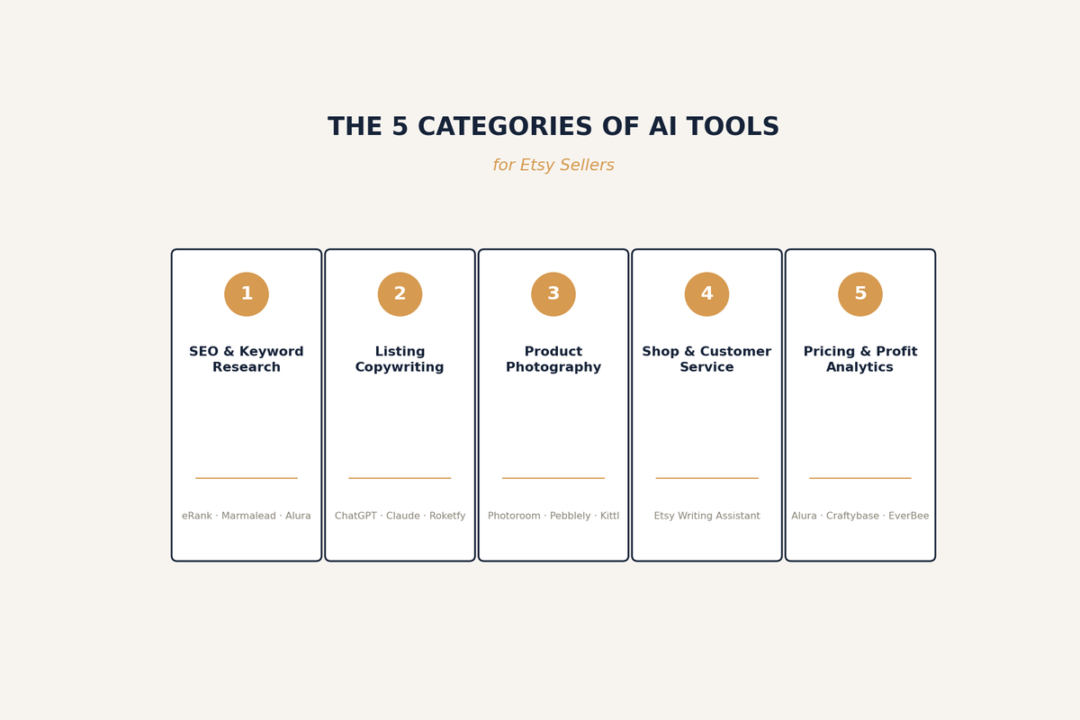
Best AI tools for Etsy sellers fall into five categories: SEO and keyword research, listing copywriting, product photography, shop management and customer service, and pricing or profit analytics. Purpose-built Etsy tools like eRank, Marmalead, and Alura pull real marketplace data that general AI assistants can’t see, while tools like ChatGPT and Claude are better at writing natural-sounding copy once you feed them the right keywords. Photography tools like Photoroom replace a big chunk of what used to require a studio.
The one rule that touches every category: Etsy has required AI disclosure on listings since January 2026, so how you use these tools matters as much as which ones you pick. This guide maps the whole landscape and links out to a full, dedicated article on each subtopic.
What Are AI Tools for Etsy Sellers?
AI tools for Etsy sellers are software products that use machine learning or generative AI to automate parts of running an Etsy shop — researching what to sell, writing listings, editing photos, or answering customer questions — instead of a seller doing every step by hand.
They generally split into two types:
- Etsy-native tools, built specifically around Etsy’s search algorithm and marketplace data. These know what real Etsy shoppers search for, what’s trending this month, and how a listing compares to competitors. eRank, Marmalead, Alura, and EverBee fall here.
- General-purpose AI, like ChatGPT and Claude, which have no direct access to Etsy’s data but are strong at language, reasoning, and image generation. These work best after an Etsy-native tool has told you which keywords or trends to target.
Etsy itself has also built AI features directly into the Seller Dashboard — attribute suggestions, bulk title suggestions, a buyer-message Writing Assistant, and a Stats Assistant — all free, and easy to overlook when comparing paid third-party options.
Why this matters at a market level: Etsy reported roughly 5.6 million active sellers in Q1 2026 — up about 4% year-over-year — and the overwhelming majority run one-person shops from home. AI tools are less about “keeping up with technology” and more about closing the hours gap between a solo seller and a shop with a full team.
Etsy’s AI Disclosure Rules: What Every Seller Must Know
Since January 2026, Etsy has required sellers to disclose AI use on any listing where it meaningfully shaped the final product — the photo, the description, a design element, or a mockup, per Etsy’s Creativity Standards and its official AI policy. Enforcement in the first two quarters has combined automated detection with manual review, and seller reports of removals and warnings have been common enough that unfamiliarity with the rule is a recurring theme in seller forums — worth flagging to readers even without an official Etsy-published enforcement count.
In short:
- Disclosure is expected if AI generated or meaningfully altered a photo, wrote part of the copy, or generated a design or mockup
- Switch “Made by [you]” to “Designed by [you]” in the listing’s Production section
- Add a short, visible disclosure line near the top of the description
- Undisclosed AI use risks reduced search visibility, not just a takedown
This isn’t a footnote — it’s the filter every tool recommendation below should pass through. See the full guide for the exact disclosure wording, the enforcement process, and a compliance checklist.
Full guide: Etsy AI Disclosure Policy: Complete Compliance Guide →
The 5 Categories of AI Tools for Etsy Sellers
1. SEO and Keyword Research Tools
These tools pull real search volume, competition data, and trend signals from Etsy’s own marketplace — the one thing general AI simply can’t see.
- eRank — the most complete free-to-start option; keyword research, listing audits, and competitor tracking, with paid tiers roughly $6–$30/month.
- Marmalead — pulls data directly from Etsy’s search API; its Storm feature clusters keyword variations by theme; starts around $19/month.
- Alura — an all-in-one dashboard combining SEO, product research, and marketing automation with a real-time listing score.
- EverBee — leans toward product validation (sales and revenue estimates across a huge listing database) with SEO as a secondary feature.
Start here if: you don’t yet know which keywords or products are worth targeting.
Example: searching a broad term like “linen napkins” in one of these tools often shows heavy competition, while a longer variant like “linen dinner napkins set of 4” shows steady search volume with far less competition — that gap between broad and long-tail demand is exactly what these tools are built to surface.
Always remember SEO and Keyword Research Tools is most important category of Best AI Tools for Etsy Sellers.
Full guide: Best AI Keyword Research Tools for Etsy Sellers, Compared →
2. Listing Copywriting Tools
Once you have keywords, these tools turn them into a title, tag set, and description.
- ChatGPT and Claude — no Etsy data built in, but strong at natural-sounding copy once given real keywords and product details.
- Marmalead’s Marma AI and Alura’s AI writer — trained on Etsy-specific data, useful for a fast first draft that already leans toward the right structure.
Start here if: research is done and the bottleneck is turning it into publishable copy quickly.
Example prompt: “Write an Etsy title (under 140 characters) and a 150-word description for a hand-stamped sterling silver ring with a custom initial. The buyer is shopping for a personalized gift. Include these keywords naturally: custom initial ring, personalized silver ring, initial jewelry gift. Tone: warm, not salesy.” Feed a prompt like this into ChatGPT or Claude only after pulling the actual keywords from an Etsy-specific tool — the prompt is only as good as the data behind it.
Full guide: How to Write Etsy Listings with AI →
3. Product Photography Tools
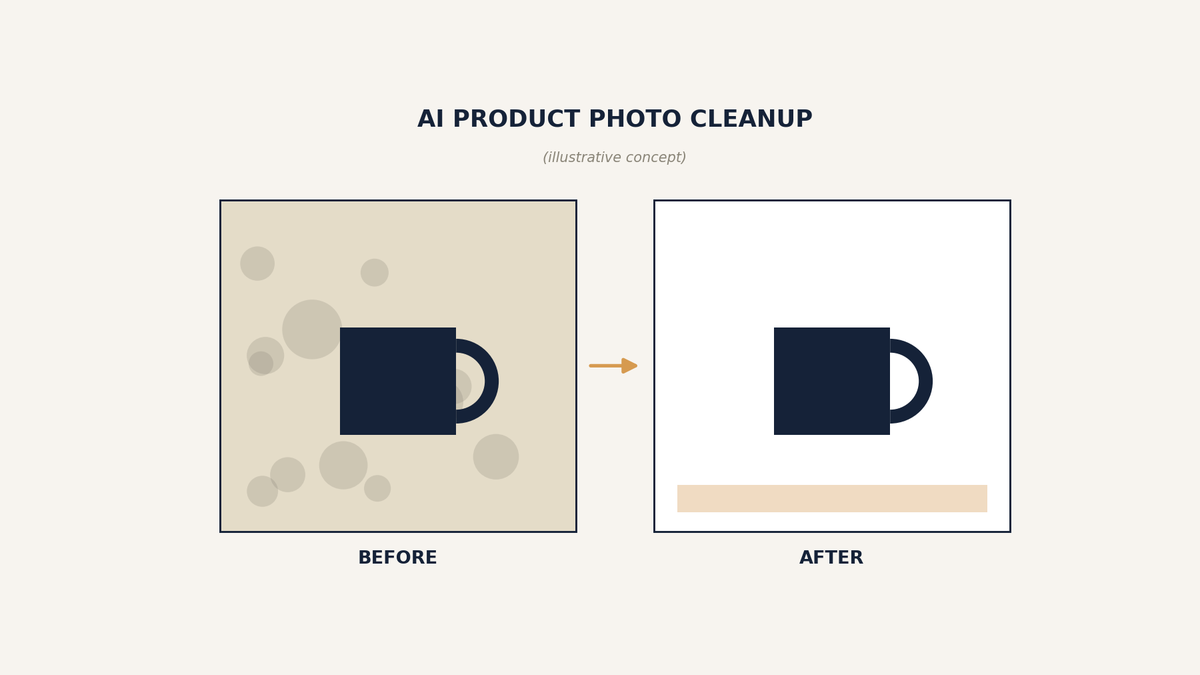
Product Photography Tools is the third category of Best AI Tools for Etsy Sellers. Etsy shoppers consistently rate photo quality as the top factor in a purchase decision — ahead of price and reviews.
- Photoroom — the most widely used option; fast background removal, AI backgrounds and shadows, mobile-first editing.
- Canva — better for full listing graphics, banners, and size charts than for pure product photography.
- Pebblely — a genuinely free tier for lifestyle background swaps, good for a brand-new shop.
- Kittl — built for print-on-demand design work like t-shirts and mugs.
Start here if: your listings are ranking but not converting — photography is usually the first thing to check.
Example: a ceramic mug photographed on a cluttered kitchen counter can be dropped into Photoroom, background swapped for a clean neutral backdrop or a styled lifestyle scene, and ready to upload in under a minute — no reshoot required.
Full guide: Best AI Product Photography Tools for Etsy Shops →
4. Shop Management and Customer Service Tools
Shop Management or Customer Service Tools considered as fourth category of Best AI tools for etsy sellers.
- Etsy’s built-in Writing Assistant and Stats Assistant — free, drafts buyer message replies in your shop’s voice and answers plain-language questions about your shop’s performance.
- Third-party auto-responder tools — handle high volumes of repetitive buyer questions once message volume outgrows manual replies.
Start here if: buyer messages are eating into time you’d rather spend making product.
Example: a buyer asks “does this run true to size?” — Etsy’s Writing Assistant drafts a reply using the listing’s actual size details and your past answers to similar questions, ready to send as-is or edit before replying.
Full guide: AI Tools for Etsy Shop Management and Customer Service →
5. Pricing and Profit Analytics Tools
Pricing and Profit Analytics Tools is the fifth category of Best AI Tools for Etsy Sellers. These tools calculate what a listing actually earns after materials, packaging, and Etsy’s fee stack — the number that decides whether a product is worth scaling.
- Alura — the profit calculator built into its all-in-one dashboard factors in item price, materials cost, and offsite-ad opt-in to show real margin per listing; free within Alura’s free tier.
- Craftybase — free Etsy pricing and fee calculators suggest a price based on materials, labor, and markup; its paid platform (from around $49/month) adds full inventory and cost-of-goods tracking for sellers producing at volume.
- EverBee — its Fee Calculator estimates Etsy’s marketplace fees per listing, useful for sizing up a competitor’s margin, though it doesn’t factor in your own production costs — pair it with Alura or Craftybase for the full picture.
Start here if: You’re not sure which of your listings are actually profitable once fees and materials are subtracted.
Example: a $28 listing with $6 in materials and $3 in packaging can look profitable until Etsy’s combined fees (roughly 11-15% after payment processing and transaction fees) and any ad spend are factored in — a profit calculator surfaces the real per-listing margin before you decide whether to scale that product.
Full guide: Best AI Analytics Tools for Etsy Sellers →
Etsy-Specific Tools vs. General AI Assistants
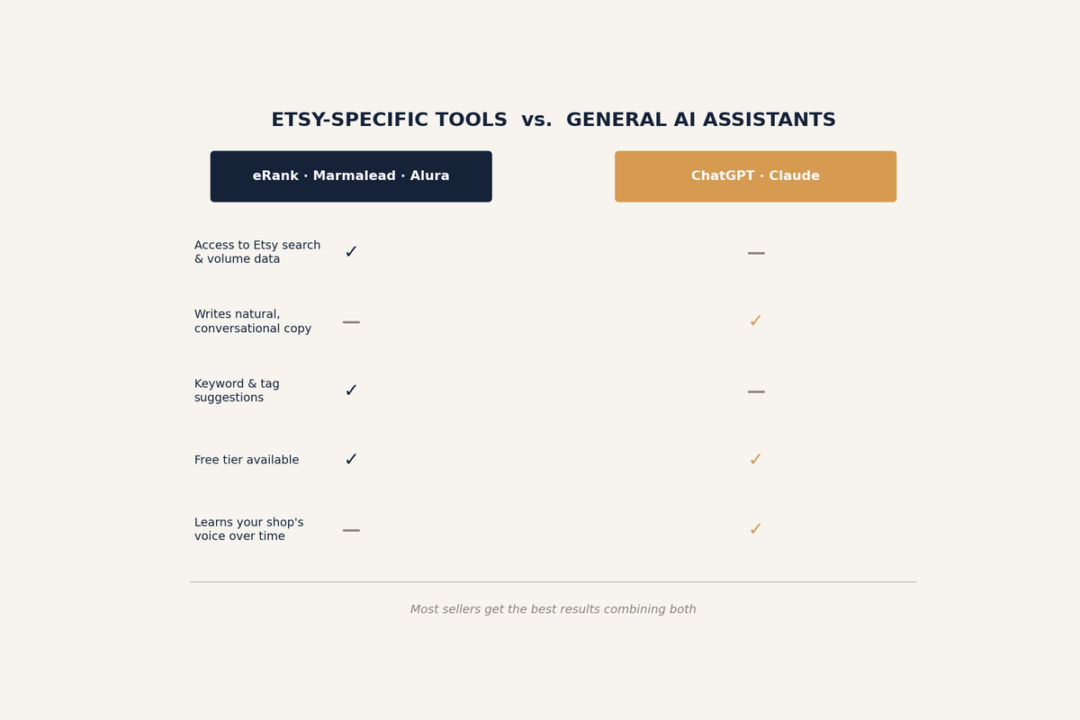
This is the distinction sellers most often get wrong: assuming a general AI assistant “knows” what sells on Etsy.
| Etsy-Specific Tools (eRank, Marmalead, Alura) | General AI (ChatGPT, Claude) | |
|---|---|---|
| Knows Etsy search volume | Yes | No |
| Writes natural-sounding copy | Adequate, often needs editing | Strong |
| Tracks competitor sales | Yes (estimates) | No |
| Generates images | Limited or none | Varies by tool |
| Best used for | Research and validation | Execution, once you have the data |
The most effective workflow uses both: an Etsy-specific tool to find what to say, and a general AI assistant to say it well.
How to Choose the Right AI Tools for Your Shop
Work through these questions in order rather than picking tools by popularity:
- What’s actually slowing you down right now? Not finding keywords, writing listings, taking photos, or answering messages — pick the category that matches your real bottleneck, not the one with the most reviews.
- How many listings are you managing? Under 20, free tiers usually cover you. Over 100, you’ll hit search or export caps fast and paid tiers pay for themselves in saved time.
- Do you already have keyword data? If not, start with an SEO tool before a copywriting tool — writing polished copy for the wrong keywords wastes the copy.
- Can you keep disclosure consistent with this tool? If a tool makes it hard to remember or apply AI disclosure across every listing, factor that friction into the decision.
Free vs. Paid: What You Actually Need to Pay For
| Need | Free Option | Worth Paying For When… |
|---|---|---|
| Keyword research | eRank free plan, EtsyHunt free plan | Managing 100+ active listings |
| Listing copy | ChatGPT or Claude free tier | Writing 10+ new listings a week |
| Product photos | Photoroom or Pebblely free tier | You need batch processing or no watermark |
| Competitor research | EverBee free extension | Tracking niche trends weekly |
Stay on free tiers until a daily search cap, watermark, or export limit is genuinely slowing you down. At that point, most paid tiers pay for themselves within a month or two in time saved.
Building Your AI Stack by Shop Stage
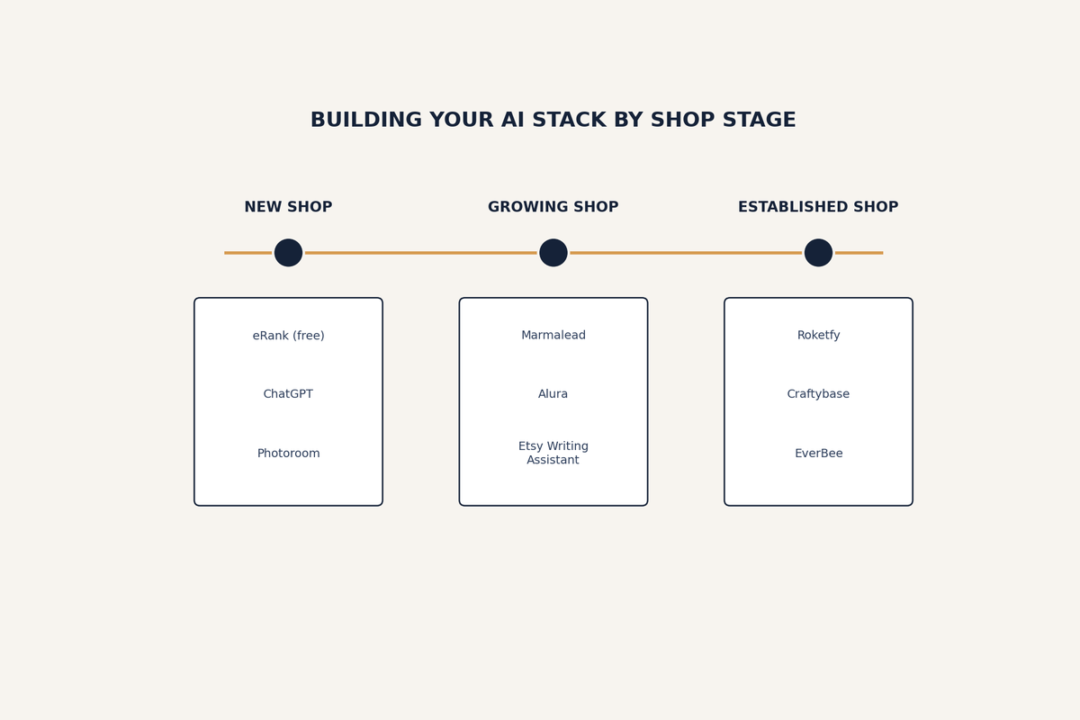
Brand-new shop (0–20 listings)
- eRank or EtsyHunt free plan for keywords
- ChatGPT or Claude free tier for descriptions
- Pebblely or Photoroom free tier for photos
Growing shop (20–100 listings, steady sales)
- Alura or Marmalead paid plan for deeper SEO and real-time listing scoring
- A defined AI-writing prompt template, run through your general assistant
- Photoroom Pro for batch photo processing
Established shop (100+ listings, multiple product lines)
- eRank Expert or Alura’s top tier for competitor tracking at scale
- Sale Samurai for bulk tag analysis across a large catalogue
- A catalogue-focused photo system for shop-wide visual consistency
- A dedicated customer-message tool once buyer inquiries outgrow manual replies
Glossary of Key Terms
- Etsy SEO — optimizing a listing’s title, tags, attributes, and description to rank higher in Etsy’s internal search.
- Listing quality score — Etsy’s internal signal combining relevancy, conversion rate, and other performance factors to rank listings.
- 13 tags — the maximum number of search tags Etsy allows per listing; a common target for full keyword coverage.
- Long-tail keyword — a longer, more specific search phrase, generally lower competition and higher purchase intent than a broad term.
- AI disclosure — Etsy’s required notice on listings where generative AI meaningfully shaped the final product.
- Print-on-demand (POD) — a fulfillment model where products are manufactured only after a sale, common among Etsy sellers using AI-generated designs.
- Generative AI — AI models (like ChatGPT, Claude, or image diffusion models) that create new text or images from a prompt, as opposed to just editing existing content.
- Listing audit — an automated check of a listing against SEO best practices, typically flagging missing tags, weak titles, or thin descriptions.
FAQs of AI Tools for Etsy Sellers
What’s the best free AI tools for Etsy sellers?
eRank’s is one of the best free ai tools for etsy sellers. eRank’s free plan is the strongest starting point for SEO. For photos, Photoroom’s free tier or Pebblely’s free lifestyle images cover a small shop’s needs.
Do I have to disclose AI use on every Etsy listing?
Only when AI meaningfully shaped the final product — the image, the description, or the design. See the full disclosure guide for exact rules.
Is ChatGPT or Claude better for writing Etsy listings?
Both do the same core job well. Neither has Etsy search data built in, so the choice usually comes down to personal preference — more detail in the listing-writing guide.
How much should I budget for AI tools as an Etsy seller?
$0 to start, using free plans. A growing shop running one SEO tool plus one photo tool typically lands between $15–$40/month. A full stack across SEO, photography, and customer service can reach $75–$150/month.
Will using AI tools hurt my Etsy search ranking?
No — using AI tools isn’t penalized on its own. What gets penalized is undisclosed AI use and low-effort, unedited output.
Conclusion
The AI tools worth using on Etsy in 2026 map to five clear jobs: finding what to sell, writing about it well, photographing it professionally, managing the shop day to day, and pricing it correctly. Start with whichever category matches your actual bottleneck, use free tiers until they genuinely run out, and build the disclosure habit into your workflow from the first AI-assisted listing rather than retrofitting it later. Explore the linked guide for each category above for the full breakdown.