
Table of Contents
Quick Answer
AI virtual staging tools use image-generation AI to digitally furnish, redecorate, or declutter real estate listing photos in seconds rather than days. The market splits into three tiers: fast AI-only apps like Virtual Staging AI (now owned by Zillow) and Collov AI, which run roughly $0.30 to $5 per image; hybrid platforms like Styldod and ApplyDesign, which combine AI speed with human design review; and full-service editing companies like BoxBrownie, which charge $16 to $32 per image for hand-finished results with a 24 to 48-hour turnaround.
If you’re staging multiple listings a month, a subscription AI tool is the better value. If you have one luxury property where every photo needs to be flawless, a hybrid or human-reviewed service is worth the extra cost and wait. The sections below cover real pricing, how each tool performs, and how to stay compliant with MLS disclosure rules.
What Is AI Virtual Staging, and Why Has It Taken Over Real Estate Marketing?
Virtual staging is the practice of digitally adding furniture, decor, and lighting to photos of empty or outdated rooms so buyers can picture the space furnished. Traditional staging does this physically, with rented furniture moved into the home. AI virtual staging does the same job inside a photo editor, using a trained image model instead of a moving truck.
The core workflow is nearly identical across every AI virtual staging tool on the market:
- Upload a photo of an empty (or furnished) room
- Select a room type and a design style — modern, Scandinavian, farmhouse, coastal, luxury, and so on
- Let the AI generate a staged version
- Download the finished image, usually with a “virtually staged” watermark already applied
How AI Virtual Staging Differs From Traditional Staging
The gap between the two comes down to cost, speed, and flexibility:
- Cost. Industry pricing surveys put traditional physical staging at roughly $800 to $2,900 per property for a basic package, climbing to $2,500–$6,000-plus for a full-home package rented over a 30 to 60-day listing period. AI staging runs anywhere from under a dollar per image on subscription plans to $30-ish per image on premium hybrid services.
- Speed. A moving crew needs days to deliver and arrange furniture. Most AI staging apps generate an image in 15 to 60 seconds.
- Flexibility. With physical furniture, you’re locked into one look until the movers come back. With AI virtual staging software, you can generate the same room in five different styles in the time it takes to make coffee, which is useful for testing which look gets the most clicks on a listing.
Why Real Estate Agents Are Switching to AI Staging Software
Three forces are driving adoption:
- Vacant listings underperform. Empty rooms are harder for buyers to size up mentally, and photos of bare rooms tend to generate less engagement than furnished ones.
- Budgets are tighter than they used to be. An agent staging five vacant listings a month can spend well into five figures on physical staging alone. AI virtual staging tools cut that cost by well over 90% in most cases.
- The technology is genuinely good now. Early AI-generated interiors were easy to spot — warped furniture, floating lamps, walls that didn’t quite line up. Current-generation models preserve room geometry, window light, and floor material far more reliably, which is why buyers increasingly can’t tell a virtually staged photo from a professionally staged one at a glance.
Overall Comparison of The Best AI Virtual Staging Tools for Real Estate in 2026
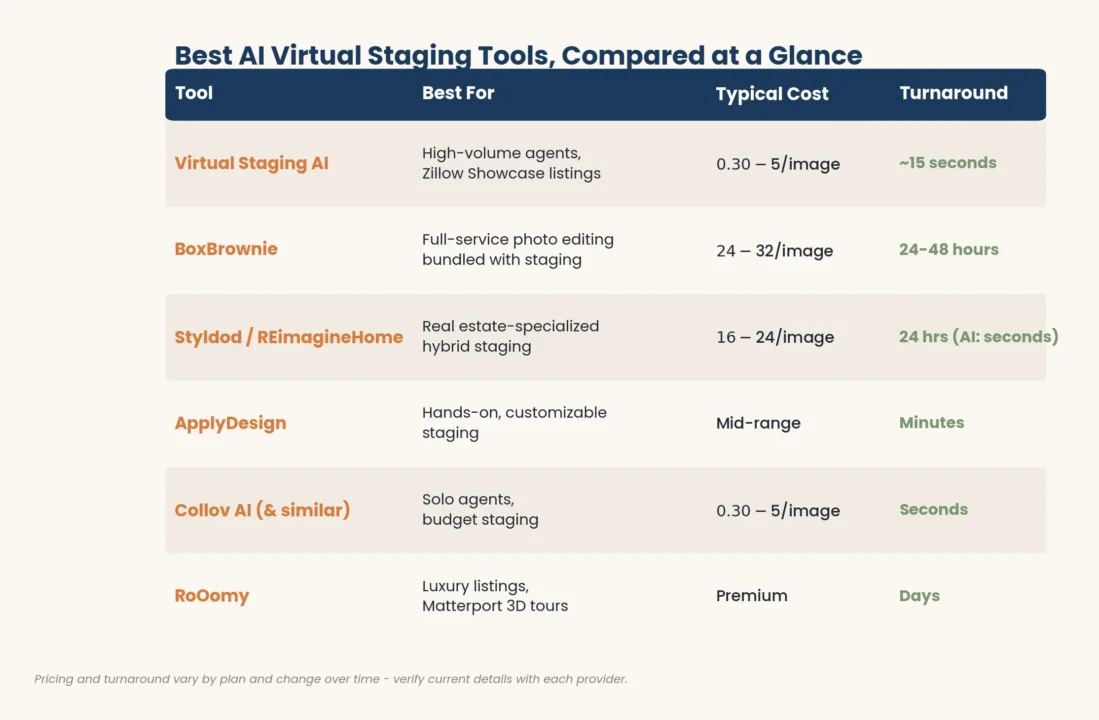
Here’s how the most established platforms compare, based on pricing model, turnaround, and the type of agent each one fits best.
| Tool | Best For | Typical Cost | Turnaround |
|---|---|---|---|
| Virtual Staging AI (Zillow) | High-volume agents, Zillow Showcase listings | Pay-per-image or subscription, roughly $0.30–$5/image | ~15 seconds |
| BoxBrownie | Full-service photo editing bundled with staging | $24–$32 per image | 24–48 hours |
| Styldod / REimagineHome | Real estate–specialized hybrid staging | ~$16–$24 per image | 24 hours (AI: seconds) |
| ApplyDesign | Hands-on, customizable staging | Mid-range, minutes-based | Minutes |
| Collov AI and similar AI-only apps | Solo agents, budget staging | Subscription, ~$0.30–$5/image | Seconds |
| RoOomy | Luxury listings, Matterport 3D tours | Premium (human-designed) | Days |
1. Virtual Staging AI — Best Overall for Speed and Scale
Virtual Staging AI (often shortened to VSAI) built its reputation on fast, affordable, one-click staging: upload a photo, choose a room type, pick from dozens of furniture styles, and generate a result in around 15 seconds. Zillow acquired the company in October 2024 and began folding its technology directly into Zillow Showcase in September 2025, letting home shoppers tap a button on a listing photo and see the room restyled in real time.
What stands out:
- Multi-view staging that keeps furniture placement consistent across different camera angles of the same room
- A furniture replacement mode for occupied listings, where the AI removes existing furniture before restaging
- Direct integration with Zillow Showcase — Zillow’s premium listing tier, which the company reports sells for roughly $7,000 more on average than standard listings; virtual staging is one of the newer features layered into that product, not a separately measured driver of that number
Best for agents who stage a high volume of listings and want the fastest possible turnaround without sacrificing realism.
2. BoxBrownie — Best for Full-Service Photo Editing
BoxBrownie isn’t a pure AI tool — it’s an Australian real estate photo-editing company where human editors manually place furniture, adjust lighting, and fine-tune shadows and scale. That human step is both its strength and its main limitation.
What stands out:
- A wide service menu beyond staging: image enhancement, day-to-dusk conversion, item removal, floor plans, and virtual renovations
- Unlimited revisions if you’re not happy with the result
- A strong reputation for design quality, reflected in a high customer rating on review platforms like Trustpilot
The tradeoff is cost and speed. At roughly $24 to $32 per staged image with no subscription discount, a typical 6 to 8-room listing can run $150 to $250 just for staging, and each image takes up to 48 hours. That math makes more sense for occasional use (one or two listings a month) than for agents staging in volume.
3. Styldod / REimagineHome — Best Real Estate–Specialized Hybrid
Styldod positions itself specifically for real estate, unlike generalist photo-editing shops that also serve retail and automotive clients. Its virtual staging is handled by designers with real estate–specific training, and its AI arm, REimagineHome, offers instant AI-generated staging for agents who want speed over the fully human-reviewed option.
What stands out:
- Real estate–focused design sensibility (furniture scale, buyer psychology, listing photography conventions)
- A 24-hour turnaround on human-assisted orders, faster than many full-service competitors
- The option to move between AI speed and designer polish depending on the listing
Best for agents who want the reassurance of real estate–specific design expertise without committing to the slowest, most expensive tier of the market.
4. ApplyDesign — Best for Hands-On Customization
Formerly known as PadStyler, ApplyDesign sits between instant AI tools and fully outsourced designer services. Its browser-based editor lets you select individual furniture pieces, resize them, reposition them, and swap decor manually — a level of control that one-click AI staging apps don’t offer.
What stands out:
- Granular, drag-and-drop control over every item in the room
- Real furniture integration from major retailers in some workflows, adding shopping-list authenticity to staged images
- A middle-ground price and turnaround (minutes, not seconds or days)
Best for agents or designers who have a specific look in mind and don’t want to leave the final composition entirely up to an algorithm.
5. Collov AI and Similar AI-Only Apps — Best Budget Option
A cluster of AI-only interior design and staging apps — Collov AI among them — targets solo agents and DIY users who want the lowest possible cost per image. These platforms typically run on monthly credit subscriptions, with free tiers or trial credits to test quality before paying.
What stands out:
- Very low per-image cost, often well under $1 at subscription volume
- Simple, template-driven interfaces with minimal learning curve
- Useful for rental listings, starter homes, or any property where a $30-per-image service doesn’t make financial sense
The tradeoff: free and entry-tier plans usually watermark exports or cap resolution, and output consistency can vary more than with hybrid or human-reviewed services.
6. RoOomy — Best for Luxury Listings and Matterport Tours
RoOomy takes the opposite approach from AI-only apps: instead of an algorithm, human designers create the staged images by hand, including for Matterport 3D tours as an official Matterport partner. Pricing runs well above every other tool on this list, but for luxury listings where the photography functions as the brochure, the extra polish is often worth it.
Best for luxury listing agents, developers, and any property where the marketing budget supports premium, fully bespoke visuals.
Other Tools Worth Knowing
The six above cover the main use cases, but a few other names come up often enough to mention: PhotoUp and VirtualStaging.ai run similar AI-plus-review models in the mid-price tier, and Homestyler offers a free, mobile-first entry point that’s fine for testing the concept before you commit to a paid plan. All of these rely on the same underlying idea — a generative AI model trained on interior photography using computer vision to understand room geometry, then filling the space with realistic furniture.
How Much Does AI Virtual Staging Cost?
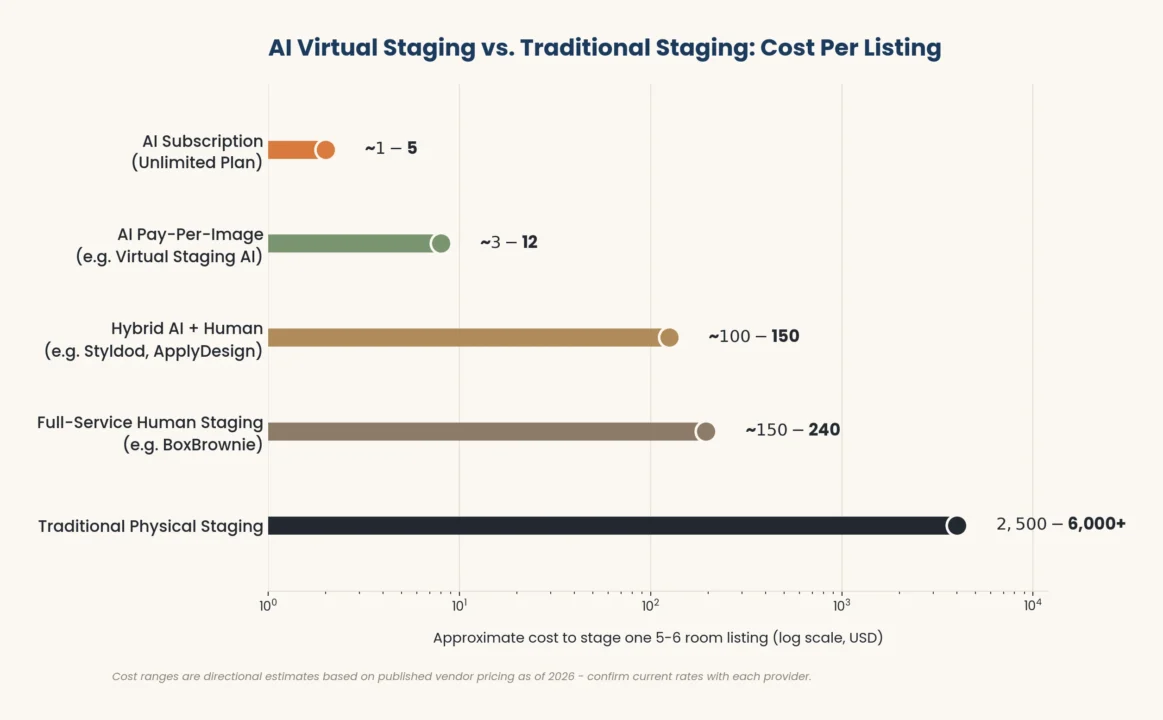
Pricing in this space generally falls into three brackets:
- AI-only, self-serve platforms: roughly $0.30 to $5 per image, often sold as monthly credit subscriptions with unlimited regenerations.
- Hybrid AI-plus-human platforms: roughly $13 to $24 per image, with 24-hour turnaround on the human-reviewed tier.
- Full-service, human-designed staging: roughly $24 to $40-plus per image, with 24 to 48-hour turnaround and no subscription discount in most cases.
For comparison, traditional physical staging still runs $800 to $2,900 per property for a basic package, or several thousand dollars for a whole-home package over a standard listing period. Even the priciest AI or hybrid tool on this list costs a small fraction of that.
How to Choose the Right AI Virtual Staging Tool
If You Stage a High Volume of Listings
Go with a subscription AI platform (Virtual Staging AI, Collov AI, or similar). The per-image cost drops dramatically at volume, and unlimited regenerations let you test multiple styles without worrying about a per-photo bill.
If You’re Staging One or Two Listings a Month
A pay-per-image service like BoxBrownie or Styldod gives you flexibility without committing to a subscription you might not use again for weeks.
If the Listing Is Luxury or Ultra-High-End
Consider a human-designed service like RoOomy or Styldod’s designer tier. Buyers evaluating a seven-figure property are more likely to notice small realism issues, and the cost of premium staging is negligible relative to the sale price.
If You Want Full Creative Control
ApplyDesign’s manual editor is the strongest option if you (or a designer on your team) want to place every item yourself rather than accept whatever the algorithm generates.
Is AI Virtual Staging Legal? MLS Rules and Disclosure
Yes — virtual staging is legal in every U.S. state, and every major MLS permits it, provided it’s properly disclosed. The core principle comes from the National Association of Realtors’ Code of Ethics (Article 12), which requires that real estate advertising present a true and accurate picture of the property. A staged photo isn’t misleading as long as buyers are told the furniture isn’t physically in the home.
What Disclosure Actually Requires
Rules vary somewhat by MLS board, but the common pattern across major systems (including Bright MLS, Stellar MLS, CRMLS, and MLS PIN) includes:
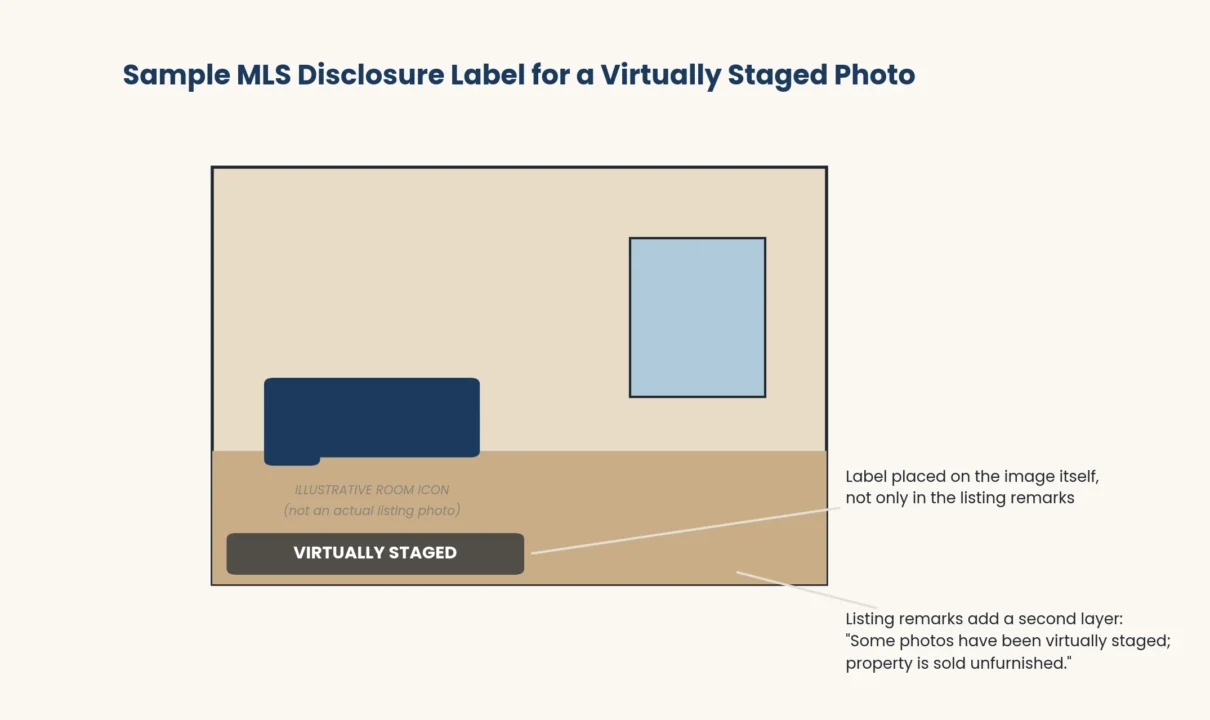
- A visible label — typically “Virtually Staged” — placed directly on the image, not buried only in the listing remarks
- A note in the listing description stating that some photos have been digitally altered
- In many MLS regions, an unaltered “as-is” photo of the same room included alongside the staged version
Most AI virtual staging apps now build a disclosure watermark directly into the export, which covers the image-level requirement automatically. Adding one sentence to your listing remarks — something like “Some photos have been virtually staged; the property is sold unfurnished” — typically satisfies the rest.
California’s AB 723
California’s Assembly Bill 723 took effect January 1, 2026, and is currently the strictest state-level rule in the country. It requires licensees to disclose any digitally altered listing photo and to make the original, unaltered image available directly before or after the altered one — covering MLS listings as well as the agent’s own website, social media, and print marketing.
What You Can and Can’t Change
The line MLS boards consistently draw is between adding removable items and altering the property itself:
- Allowed with disclosure: adding furniture, decor, rugs, and art; clearing an occupied room to show it empty; day-to-dusk exterior conversions; minor landscaping touch-ups
- Not allowed under any circumstances: removing structural elements, changing cabinets, countertops, flooring, or paint colors to misrepresent the home’s actual condition, or using virtual staging to hide a defect like water damage or a wall crack
Violating disclosure rules can result in MLS fines, formal complaints to a state licensing board, or in serious cases, civil liability for misrepresentation — so it’s worth building the labeling habit into every listing from day one rather than treating it as optional.
Step-by-Step: How to Virtually Stage a Listing With AI
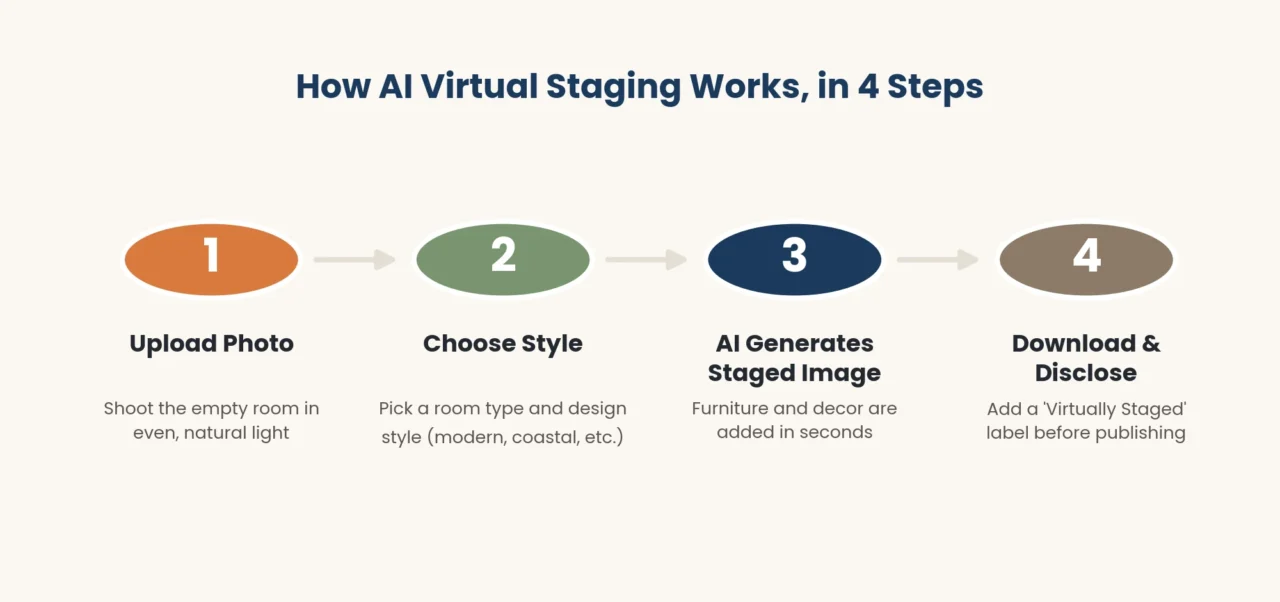
- Shoot in even, natural light. Photograph the empty room with the listing camera or a phone, ideally with all interior lights on and curtains open. Flat, shadow-free lighting gives the AI a cleaner base image to work from.
- Upload the highest-impact rooms first. Living room, primary bedroom, and kitchen typically drive the most engagement, so prioritize these if you’re working with a limited free tier or budget.
- Choose a style that matches the buyer profile for that price point and neighborhood, not just your personal taste.
- Generate two or three style variations before settling on one — most subscription tools include unlimited or near-unlimited regenerations.
- Apply the “virtually staged” watermark if your tool doesn’t add one automatically.
- Upload both the staged and original photos to the MLS, and add a one-line disclosure to your listing remarks.
Does Virtual Staging Actually Help Sell Homes?
The data suggests yes, though the effect is more about buyer engagement and perceived value than a guaranteed price jump. According to NAR’s 2025 Profile of Home Staging report, roughly 30% of agents said staging increased the dollar amount buyers offered by 1% to 10%, and about half of agents said staged homes sold faster than comparable unstaged properties. Most notably, 83% of buyer’s agents said staging made it easier for buyers to picture themselves living in the home — which is the entire point of virtual staging in the first place.
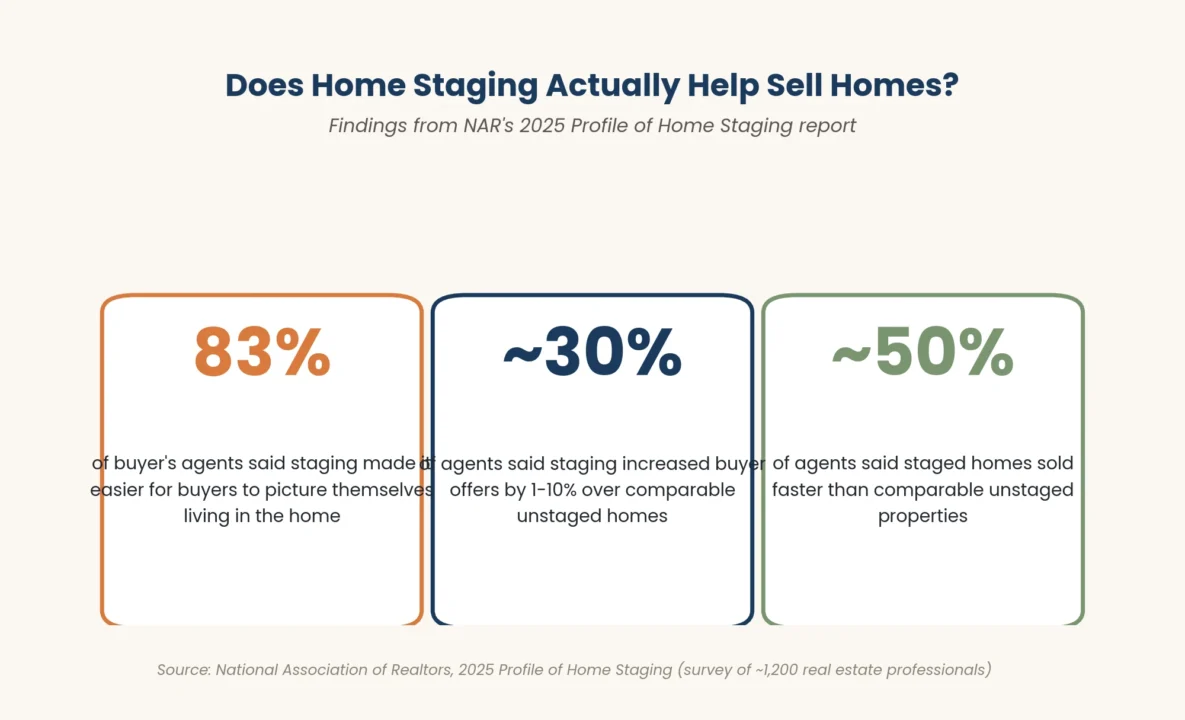
That data was collected across staging broadly, not AI staging specifically, but the underlying buyer psychology doesn’t change based on whether the furniture was carried in by movers or generated by software. What matters to a buyer scrolling listing photos is whether the room looks lived-in and inviting — not how that look was produced.
Common Mistakes to Avoid With AI Virtual Staging
- Skipping disclosure to “make it look real.” This is the single most common compliance mistake, and it’s also the easiest to avoid — a small watermark costs you nothing in buyer engagement.
- Over-styling for the price point. Staging a $250,000 starter home in ultra-luxury furniture sets the wrong buyer expectation and can backfire during the in-person showing.
- Ignoring furniture scale. A staged photo with a king bed and two nightstands crammed into a 10-by-12 bedroom is one of the fastest ways to make virtual staging look fake — check that the generated furniture actually fits the room’s real dimensions.
- Mixing styles across rooms in the same listing. Modern living room, farmhouse kitchen, and coastal bedroom photos in one gallery send a confusing signal about who the home is “for.”
- Staging around a defect. Never use furniture placement to obscure water stains, cracks, or other issues a buyer will see in person. Beyond the ethical problem, this is the scenario most likely to trigger a legitimate misrepresentation complaint.
Frequently Asked Questions
What is the best AI virtual staging tool for real estate agents?
There isn’t a single best tool for every agent — it depends on volume and budget. Virtual Staging AI is a strong choice for speed and scale, especially given its integration with Zillow Showcase. BoxBrownie or Styldod fit better if you want a human-reviewed result and only stage occasionally. ApplyDesign suits agents who want hands-on control over the final composition.
How much does AI virtual staging cost per photo?
AI-only subscription platforms typically run $0.30 to $5 per image. Hybrid services with human review land around $13 to $24 per image. Full-service, human-designed staging (like BoxBrownie or RoOomy) runs $24 to $40-plus per image.
Is AI virtual staging legal for MLS listings?
Yes, in every U.S. state, as long as it’s disclosed. NAR’s Code of Ethics and individual MLS rules require a visible “virtually staged” label on the photo and, in many regions, an unaltered version of the same room uploaded alongside it.
Do I have to disclose that a listing photo was virtually staged?
Yes. Nearly every MLS board requires disclosure, either through a watermark on the image itself, a note in the listing remarks, or both. California’s AB 723, effective 2026, is currently the strictest state-level version of this requirement.
Can virtual staging be used on an already-furnished home?
Yes. Most modern AI virtual staging tools include a furniture removal or replacement feature that clears the existing furniture from a photo before restaging it — useful for occupied homes with dated or mismatched decor.
How long does AI virtual staging take?
Pure AI platforms typically deliver a staged image in 15 to 90 seconds. Hybrid services with human review usually take around 24 hours. Fully human-designed services like BoxBrownie or RoOomy can take 24 to 48 hours or longer.
Does virtual staging actually help sell a home faster?
Industry data points that way. NAR’s 2025 Profile of Home Staging found about half of agents reported staged homes sold more quickly, and 83% of buyer’s agents said staging helped buyers picture themselves living in the space — the main driver behind faster offers.
Conclusion
AI virtual staging has moved from a novelty to a standard part of the real estate marketing toolkit, and the choice today isn’t really whether to use it — it’s which platform fits your listing volume, budget, and how much creative control you want over the final image. High-volume agents will get the most value from a fast subscription tool like Virtual Staging AI. Occasional users or luxury listings often justify the extra cost of a hybrid or fully human-designed service. Whichever you choose, the one non-negotiable step is disclosure — label every staged photo, note it in your listing remarks, and you’ll get all the marketing benefit with none of the compliance risk.
If you’re building out a broader AI workflow beyond staging, this guide is part of a larger series covering the best AI tools for real estate agents — from listing description generators to lead-response chatbots — worth a look once your staging process is dialed in.