
Table of Contents
Quick Answer
The best free AI tools for real estate agents in 2026 cover five jobs: writing (ChatGPT, Claude), design (Canva), virtual staging (Remodel AI, HomeDesigns.AI), video (CapCut, DaVinci Resolve), and admin (Otter.ai for call transcripts, Brevo for email automation). Every one of these has a genuinely usable free tier, not just a crippled trial.
None of them are real estate-specific out of the box, so they need your local knowledge and a few good prompts to produce anything client-ready. The right approach isn’t picking one “best” tool. It’s assembling two or three free tools around your actual bottlenecks — usually listing descriptions, staging vacant photos, and following up with leads fast — then upgrading only the one that’s saving you the most time. Most solo agents can run a full AI-assisted marketing workflow for $0 to $30 a month.
Why Agents Are Building an AI Toolkit Right Now
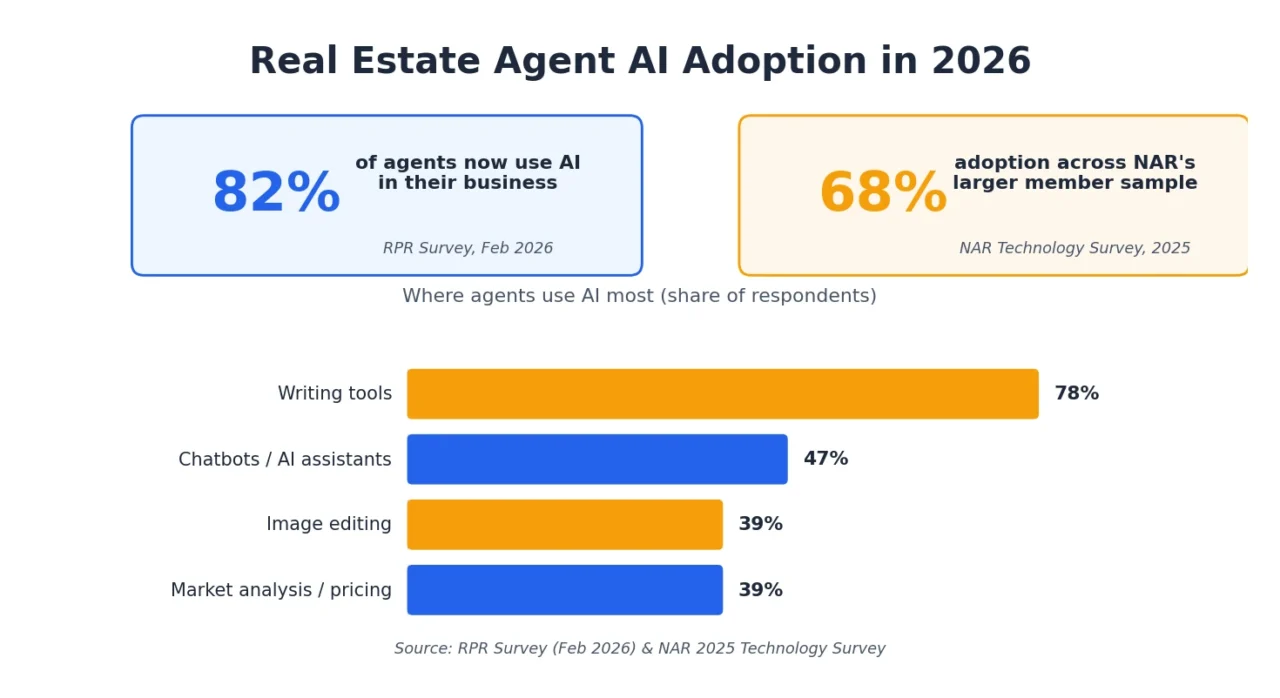
AI adoption among real estate agents, brokers, and Realtors alike isn’t a fringe trend anymore. A February 2026 survey from Realtors Property Resource, an NAR subsidiary, found that 82% of agents now use AI somewhere in their business, and 92% are either using it or planning to. NAR’s own 2025 Technology Survey, based on a much larger sample, put adoption at 68%, with 46% of agents specifically using AI-generated content.
Where does that usage actually go? According to the RPR data, writing tools top the list at nearly 78% of respondents, followed by chatbots and AI assistants (47%), image editing (39%), and market analysis or pricing tools (39%). Agents report the biggest time savings in writing listing descriptions, drafting social media content, and composing emails or newsletters — exactly the tasks free AI tools handle best.
The catch is accuracy. In the same survey, 63% of agents named inaccurate AI output as their top concern, and nearly half worried about compliance or fair housing issues. That’s worth keeping in mind as you read through this list: AI tools for real estate agents are speed multipliers for first drafts, not a replacement for your judgment, your MLS knowledge, or a final human read-through before anything goes out to a client.
How These Free AI Tools Were Chosen
To make this list, a tool had to meet three bars:
- A real free tier, not a seven-day trial that requires a credit card
- A clear use case for real estate agents, whether general-purpose or industry-specific
- No hidden dealbreaker, like unusable watermarks or output that can’t leave the platform
Where a free plan genuinely limits what an agent can do, that’s called out directly, along with the budget-friendly upgrade if one exists.
1. Free AI Tools for Listing Descriptions, Emails & Social Captions
Writing is where AI delivers the fastest, most obvious return for agents, and it’s the single most-used AI category in the industry right now.
ChatGPT
ChatGPT remains the most widely used AI writing tool available to agents, and the free tier (currently running on OpenAI’s lighter GPT-4o mini model) handles most day-to-day real estate writing without issue. Paste in your property notes and ask for an MLS-ready description, draft a re-engagement email to a lead who went quiet after a showing, or generate a week’s worth of social captions from one listing detail.
The output quality depends entirely on your input. A prompt like “write a listing description for a 3-bed semi-detached home in [neighborhood] with a renovated kitchen and south-facing backyard” produces something usable. “Write a listing description” produces something generic that reads like every other AI-written listing on the block. Always fact-check anything ChatGPT writes about the property — it can invent features that aren’t actually there.
Pricing: Free plan available. ChatGPT Plus is $20/month and adds a more capable model, longer context, image generation, and file uploads.
Claude
Claude (built by Anthropic) is a strong alternative or companion to ChatGPT, particularly for longer-form writing — neighborhood guides, buyer or seller presentation scripts, blog content for your website, or nuanced client emails where tone matters. Agents who’ve tried both often keep ChatGPT for quick captions and turn to Claude when a piece of writing needs to sound less templated.
Pricing: Free plan available with daily message limits; paid plans start around $20/month for higher usage.
Write.Homes
Unlike general-purpose assistants, Write.Homes is trained specifically on real estate language and workflows, so the output needs less editing out of the gate. It can integrate with MLS platforms and CRMs to pull live property data directly into generated listing copy, and it supports multiple languages, which matters for agents in multilingual markets.
| ChatGPT / Claude (general AI) | Write.Homes (real estate-specific) | |
|---|---|---|
| Pros | Free tier is genuinely capable, flexible for any writing task, and has a huge community of prompt guides | Understands MLS terminology natively; less editing needed; multilingual output |
| Cons | No built-in real estate knowledge; can hallucinate property features; needs detailed prompting | Narrower use case; free tier is more limited than general AI tools |
| Best for | Agents who want one flexible tool for everything | Agents who write a high volume of listings and want less back-and-forth editing |
2. Free AI Tools for Marketing Design & Graphics
Canva Magic Studio
Canva has been an agent staple for years, but the AI features rolled out through 2025 and 2026 (bundled as Magic Studio) turned it into something closer to a design assistant than a template library. Magic Write drafts flyer and social copy, the AI image generator creates custom graphics from a text prompt, Magic Resize turns one listing graphic into every platform size in a single click, and the background remover cleans up rough listing photos in seconds.
Between the massive real estate-specific template library and the AI shortcuts, most agents can produce professional-looking just-listed posts, open house flyers, and brand-consistent social graphics without ever opening a design program.
Pros:
- Free tier is genuinely usable for basic design and social graphics
- Huge library of real estate-specific templates
- AI features cut design decision time significantly
Cons:
- Full AI feature set (brand kit, unlimited Magic Write) is behind Canva Pro
- Not built for photorealistic staging or complex layouts
Pricing: The Free tier is solid for most agents. Canva Pro runs roughly $13–15/month billed annually and unlocks the full AI suite plus a brand kit.
3. Free and Budget AI Tools for Virtual Staging
Staging still moves listings. Traditional staging companies charge anywhere from $400 to over $2,000 per room per month, which is a real barrier for agents working with vacant flips or off-market listings on a tight budget. AI virtual staging compresses that cost to a few dollars a photo — or free, depending on the tool.
A word of caution here: most MLS boards require any digitally staged photo to be clearly labeled (“Virtually Staged”) in the caption and listing description, and structural changes to a home (moving walls, adding square footage) aren’t allowed. Always check your local MLS rules before uploading.
Remodel AI
Remodel AI’s free tier stands out because it produces three full-resolution, MLS-ready staged photos with no watermark and no credit card required — most “free” competitors either watermark the image or cap you at a single low-resolution preview. For a listing with four to six rooms’ worth of photos, use the three free credits strategically on the highest-impact spaces: living room, primary bedroom, dining room.
Pricing: Free (3 designs, no watermark). Paid plan is $29/month for unlimited staging plus exterior renders, paint and floor previews, and object removal.
HomeDesigns.AI and Similar No-Signup Tools
Several browser-based virtual stagers, including HomeDesigns.AI’s free staging tool, let you upload a photo and generate a staged room with no account creation at all. These are best for quickly testing a style direction before committing to a paid batch run elsewhere, since free-tier output quality and consistency vary more than on subscription tools.
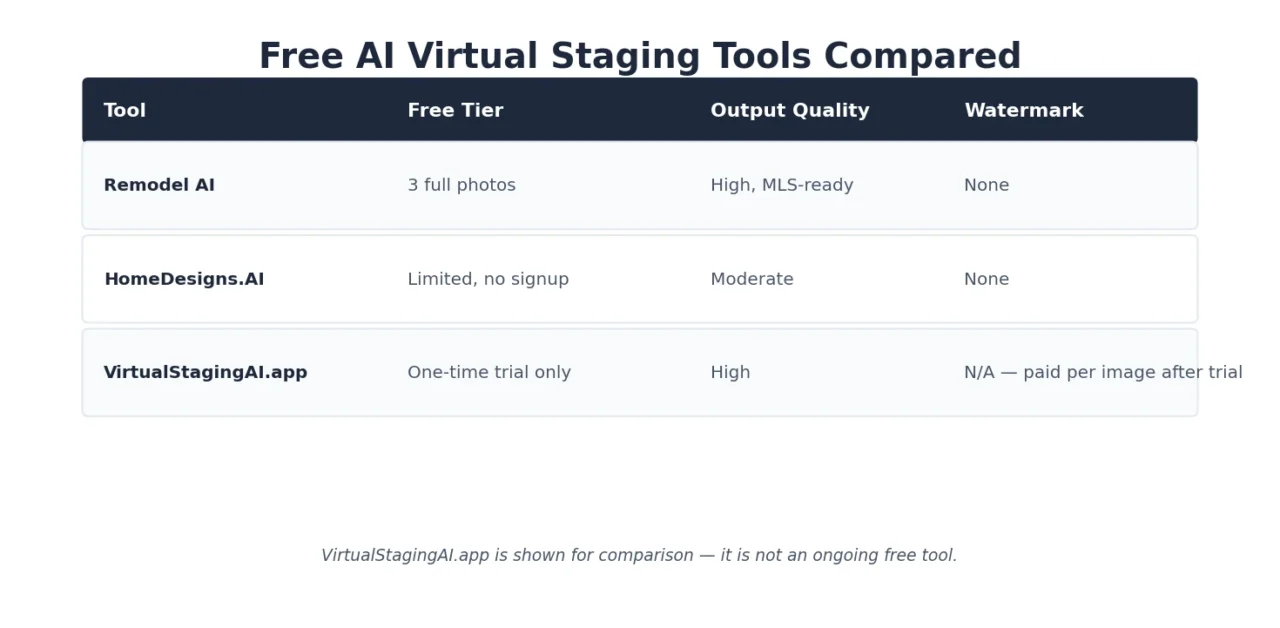
| Tool | Free tier | Output quality | Watermark |
|---|---|---|---|
| Remodel AI | 3 full photos | High, MLS-ready | None |
| HomeDesigns.AI | Limited, no signup | Moderate | None |
| VirtualStagingAI.app | Trial only | High | N/A (paid per image after trial) |
Pros of AI staging generally: near-instant turnaround, a fraction of traditional staging cost, easy to test multiple styles.
Cons: free tiers are photo-limited, quality varies from tool to tool, and every staged photo needs an MLS-compliant disclosure.
One caveat on that table: VirtualStagingAI.app is included because it’s a well-known name in the category, not because it clears the “real free tier” bar set earlier in this guide — its free access is a one-time trial, and every image after that is paid. Treat it as a paid tool worth knowing about, not a free one.
4. Free AI Tools for Real Estate Video and Social Reels
Short-form video now outperforms static posts by a wide margin on Instagram, TikTok, and YouTube Shorts, and agents who post consistently see meaningfully more profile traffic than those who stick to photos alone.
CapCut
CapCut, built by ByteDance (TikTok’s parent company), is the default video editor for agents creating social-first content. The free tier is genuinely usable, not a crippled demo: auto-captions, a deep template library, and a mobile app fast enough to edit a full listing reel — from raw clips to published post — in 20 to 30 minutes, between showings. Desktop CapCut handles longer content like home tours and market update videos.
The free tier does have caps on some AI features (like AI Auto-Edit on long videos), and a handful of premium effects add a watermark, so check the export before posting.
DaVinci Resolve
For agents who want to go further with editing — color correction, multi-clip long-form content — DaVinci Resolve is a completely free, professional-grade editor. It has a steeper learning curve than CapCut, so it fits agents making longer-form YouTube content more than quick social reels.
| CapCut | DaVinci Resolve | |
|---|---|---|
| Best for | Quick Reels/TikTok/Shorts from a phone | Long-form, professionally graded video |
| Learning curve | Low | Moderate to steep |
| Free tier limits | Watermark on some AI effects and templates | Fully free; paid Studio version is optional |
5. Free AI Tool for Call and Meeting Transcription
Otter.ai
Otter.ai transcribes buyer consultations, listing presentations, and lender calls in real time, and its mobile app also records in-person conversations — useful for agents who do most of their business face-to-face rather than over Zoom. The free plan includes 300 transcription minutes a month (roughly ten client calls), speaker identification, and integration with Zoom, Teams, and Google Meet.
The real value shows up after the call: paste the transcript into ChatGPT or Claude and ask for a follow-up email, a summary of the buyer’s stated concerns, or a list of action items. That combination turns an hour of post-meeting admin into about five minutes.
Limitation to know: the free plan only allows three lifetime audio/video file imports, so it’s built around live transcription, not bulk uploads of past recordings.
Pricing: Free (300 min/month). Pro runs about $8–10/month billed annually.
6. Free AI Chatbots for Lead Capture and Qualification
Response speed is one of the biggest levers in real estate. Industry data consistently shows buyers tend to go with whichever agent responds first, yet the average agent response time to a new lead runs well over ten hours. A website chatbot closes that gap by responding instantly, at any hour.
Free-tier chatbot builders like Conferbot (300 chats/month free) and similar no-code tools let you set up a lead-qualification flow that asks about budget, timeline, and location preference, then routes serious leads to your phone or CRM. These aren’t as deeply integrated as paid real estate-specific platforms, but for a solo agent, a free chatbot is a meaningful upgrade over a static contact form.
Pros: captures after-hours leads automatically, filters serious buyers from casual browsers, no coding required.
Cons: free tiers cap chat volume; qualification logic is more basic than paid, real estate-native platforms.
7. Free AI Tool for Email Marketing Automation
Brevo
Brevo’s free plan supports unlimited contacts, marketing automation, and web tracking, capped at 300 emails a day — plenty for most solo agents and small teams running listing announcements, market updates, or drip campaigns to a sphere of a few hundred contacts. AI-assisted subject line and copy suggestions help agents who don’t want to write every email from scratch.
Pricing: Free up to 300 emails/day. Paid plans start around $9/month for 5,000 emails.
8. Free AI Tools for Market Research and Document Review
General-purpose AI research tools have quietly become part of many agents’ workflow for tasks that used to take an afternoon.
- Perplexity is useful for quick, sourced answers on market conditions, mortgage rate trends, or local zoning questions, since it cites where its information comes from rather than presenting an unsourced summary.
- Google’s NotebookLM lets you upload disclosure packages, HOA documents, or inspection reports and ask questions against just that document set, which is faster than reading a 40-page condo disclosure line by line.
Both are useful as research accelerators. Neither should be treated as a source of legal or financial advice, and any figure they produce about pricing or market conditions is worth double-checking against your MLS’s CMA report or public listing data on sites like Zillow and Realtor.com before it reaches a client.
Budget Upgrades Worth Considering (Under $30/Month)
Once a free tool becomes a genuine bottleneck, a small paid upgrade is often the highest-leverage $10–30 an agent can spend:
- ChatGPT Plus ($20/month) — worth it once you’re writing daily and want a faster, more capable model plus image generation
- Canva Pro (~$13–15/month) — worth it once you need the brand kit for consistent logo/color placement across every graphic
- Remodel AI ($29/month) — worth it once you’re staging more than one listing a month and the 3-photo free cap runs out
- CapCut Pro (~$8/month) — worth it purely to remove the watermark on premium AI effects
Free AI Tools vs. Paid Real Estate AI Platforms
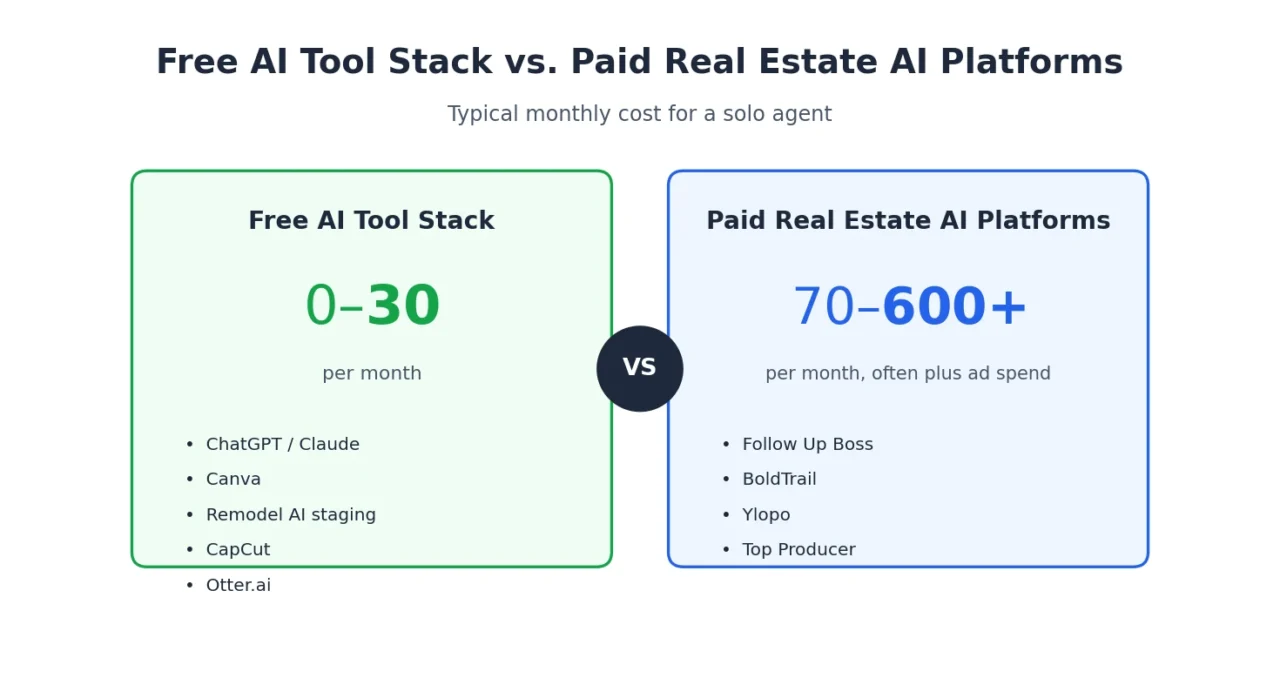
General-purpose free tools (ChatGPT, Canva, CapCut) are productivity layers — they make you faster at tasks you’re already doing. Real estate-specific platforms like Follow Up Boss, BoldTrail, Ylopo, and Top Producer are a different category: CRMs with AI layered in for lead routing, behavioral scoring, and automated nurture sequences. Almost none of these offer a real free plan; Follow Up Boss, for example, runs around $69/month per user after a 14-day trial, and platforms like Ylopo and Top Producer are quote-only with an assumed ad budget on top.
| Free general AI tools | Paid real estate AI platforms | |
|---|---|---|
| Cost | $0–30/month total | $70–600+/month, often plus ad spend |
| Setup | Minutes, no integration needed | Requires CRM setup, lead source connections |
| Best for | Solo agents, new agents, content and admin tasks | Teams and high-volume agents managing hundreds of leads |
| Limitation | No memory of your business, no automation between sessions | Real cost only becomes clear after the quote-only sales call |
The practical pattern: start with free tools until a specific bottleneck — usually lead follow-up speed — is costing you real deals. Then evaluate one paid platform built for that exact problem, rather than replacing your whole stack at once.
Building a Free AI Tool Stack: A Simple Starting Workflow
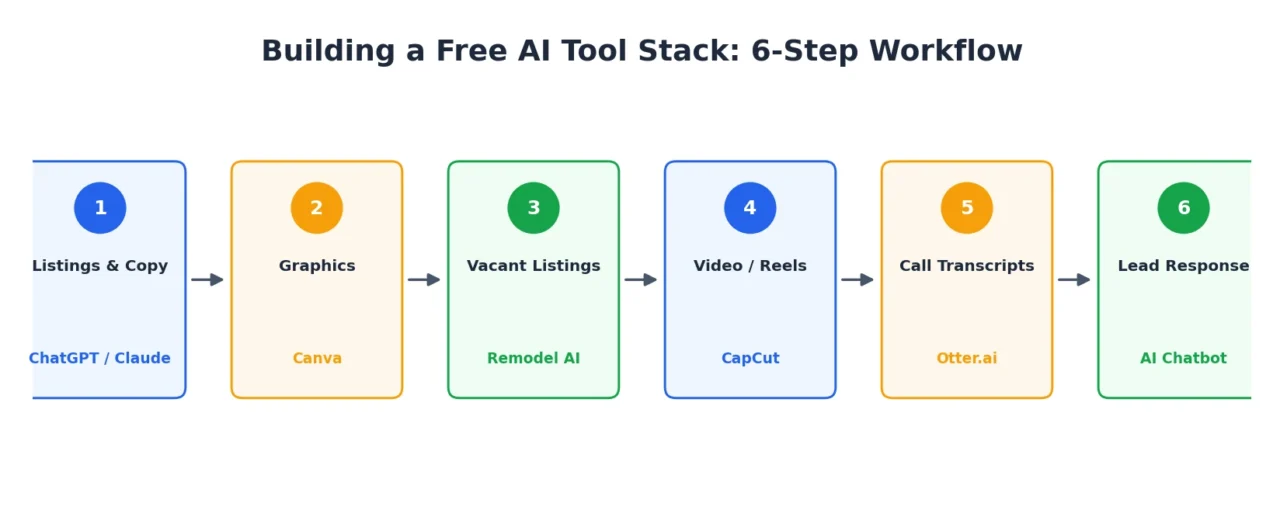
For a new or solo agent starting from zero, this is a realistic first setup:
- Listings and copy: Draft every listing description and follow-up email in ChatGPT or Claude, editing for accuracy before it goes out.
- Graphics: Build just-listed and open house posts in Canva using a template, adjusted with your brokerage’s brand colors.
- Vacant listings: Run your highest-impact rooms through Remodel AI’s three free staged photos before falling back to your MLS’s unstaged originals.
- Video: Turn listing photos and a quick walkthrough clip into a Reel in CapCut, captioned automatically.
- Calls: Transcribe buyer and seller consultations in Otter.ai, then feed the transcript to ChatGPT for a same-day follow-up email.
- Lead response: Add a free-tier chatbot to your website so after-hours inquiries get an instant reply instead of sitting until morning.
That’s six tools, from $ 0 to roughly $20–30 a month depending on volume, and it covers the tasks agents report saving the most time on.
Limitations and Compliance Considerations
A few guardrails matter more in real estate than in most industries:
- Accuracy: AI-generated listing copy can invent features or overstate condition. Always verify against your own notes before publishing.
- Fair housing: AI-written copy can unintentionally reflect biased language patterns. Review every listing description against fair housing guidelines before it goes live, the same way you would review copy written by a human assistant.
- MLS disclosure: Virtually staged photos need a clear “Virtually Staged” label in most MLS systems, and structural changes to a home aren’t permitted in staged images.
- Client data: Avoid pasting sensitive client financial details, SSNs, or full contracts into free-tier consumer AI tools, since terms of service on free plans don’t always guarantee the same data handling as enterprise tools.
FAQs
Are there any AI tools for real estate agents that are completely free, with no upgrade needed?
Yes, for specific tasks. Canva’s free tier, DaVinci Resolve, CapCut’s base tier, and browser-based staging tools like HomeDesigns.AI have no forced upgrade for basic use. ChatGPT and Claude’s free tiers also cover most day-to-day writing without a subscription.
Is ChatGPT good enough to write real listing descriptions, or do I need a real estate-specific tool?
ChatGPT’s free tier is strong enough for most listing copy, provided you give it specific, accurate property details rather than a vague prompt. A real estate-specific tool like Write.Homes becomes worth it once you’re writing high volumes and want less editing per listing.
Can I use free AI virtual staging photos on the MLS?
In most MLS systems, yes, as long as the photo is clearly labeled as virtually staged in the caption and the listing description, and the tool didn’t alter the home’s actual structure or square footage. Check your specific MLS’s photo policy before uploading.
Do free AI tools replace a real estate CRM?
No. Free AI tools like ChatGPT, Canva, and Otter.ai speed up individual tasks — writing, design, transcription — but they don’t track leads, automate follow-up sequences, or route contacts the way a CRM does. Agents managing more than a handful of active leads generally still need a dedicated CRM, AI-powered or not.
Is using AI to write listing descriptions considered plagiarism or bad for SEO?
Not inherently. Search engines don’t penalize AI-assisted content on its own; they penalize low-quality, generic, or duplicate content. Editing AI output for accuracy, local detail, and your own voice avoids both problems.
How much do real estate agents typically spend on AI and tech tools per month?
Per NAR’s 2025 Technology Survey, 34% of agents spend between $50 and $250 monthly on tech tools overall (not AI alone). A free-to-budget AI stack built from the tools above typically runs $0 to $30 a month, well under that average.
Conclusion
The most useful free AI tools for real estate agents in 2026 aren’t the ones with the flashiest features — they’re the ones that quietly remove an hour of writing, staging, or admin work from your week without costing anything to try. Start with ChatGPT for writing, Canva for design, and Otter.ai for call notes; add a free staging tool and a chatbot once you know where your actual time is going.
Upgrade one tool at a time, only when a free tier is genuinely holding you back, and keep a human read-through in every workflow before content reaches a client. That combination — free tools, deliberate upgrades, and your own judgment on top — is what turns AI from a novelty into an actual edge in a competitive market.
If you’re building out your full AI marketing stack, this page pairs naturally with our guides on AI lead generation tools, AI voice agents for real estate, and the complete Best AI Tools for Real Estate Agents 2026 pillar guide.